Guide · 12 min read · October 29, 2026
Camera movements: 16 cinematic moves and when to use them
What makes a scene feel cinematic is often not the image itself but when and how the camera moves. The same walk looks ordinary on a locked-off camera, exciting with a tracking shot behind it, and heroic from a low angle. This guide covers the difference between camera angles and camera movements, the standard shot sizes, and 16 cinematic moves one by one: what each feels like and when it works.
Camera angle vs. camera movement
| What it describes | Examples | |
|---|---|---|
| Camera angle | Where the camera sits and where it looks | Low angle, bird's-eye view, over the shoulder |
| Shot size | How much of the frame the subject fills | Wide shot, medium shot, close-up |
| Camera movement | The position or direction changing during the shot | Tracking, orbit, drone rise |
Camera angles
- Eye level: The camera sits at the subject's eye height: neutral and natural.
- Low angle: It looks up; the subject looks strong and big.
- High angle: It looks down; the subject looks small or vulnerable.
- Bird's-eye view: Straight down from above: order, pattern and distance.
- Dutch angle: The camera is tilted sideways: unease and tension.
- Over the shoulder: One character's shoulder in the foreground: the classic dialogue angle.
- Point of view (POV): Through the character's eyes, putting the viewer in their place.
Shot sizes
- Wide shot: The whole place; the subject is small and the shot tells us where we are.
- Full shot: The person head to toe, so body language reads.
- Medium shot: Waist up, for dialogue and gestures.
- Close-up: Face and shoulders; this is where emotion lives.
- Extreme close-up: An eye, a hand, or one detail of a product.
The basics: pan, tilt, zoom and dolly
A pan and a tilt turn the camera without moving it: a pan left or right, a tilt up or down. A zoom moves the lens, not the camera; the image gets bigger but the perspective stays the same. A dolly moves the camera itself toward or away from the subject; because the foreground and background shift against each other, the viewer feels like they're moving through the space. The push in and pull back below are dolly moves; the crash zoom is a lens move.
Adding handheld shake to a move makes it feel documentary and real; a speed curve (easing in and out) keeps it from looking mechanical.
16 cinematic camera movements
This list matches the 16 moves in the camera step of 3D Scene; the common industry names are in parentheses.
1. Push in (Push in, dolly in)
The camera glides slowly toward the subject, so the shot goes from wide to close.
- What it does: It pulls attention to one point and adds tension, weight and intimacy.
- When to use it: For a decision, a line that matters, or a product detail.
2. Pull back (Pull out, pull back, dolly out)
It starts close and backs away to reveal the place.
- What it does: A reveal, a sense of loneliness, or the scale of the scene.
- When to use it: To close a scene, or to show where the subject really is as a surprise.
3. Orbit (Orbit, arc shot)
The camera arcs around the subject while keeping it centered.
- What it does: It makes the subject feel heroic, shows it from every side and adds energy.
- When to use it: In product shots, a character's big moment, or tension between two people.
- In 3D Scene: The first 6 seconds of the ready-made perfume blockout are a wide half-orbit.
4. Tracking (Tracking shot, follow shot)
The camera follows a moving subject from behind; in 3D Scene it slowly swings to the side as it follows.
- What it does: It takes the viewer along for the ride, with speed and continuity.
- When to use it: With a subject that walks, runs or drives.
- In 3D Scene: In the courier example from 3 to 6 seconds: a chase that swings from behind the bike to its side.
5. Leading (Leading shot)
The camera travels backwards ahead of the subject, who moves toward it.
- What it does: It feels determined and keeps the face in view while moving.
- When to use it: Walk-and-talks, runs, a determined walk toward a goal.
6. Truck (Truck, lateral tracking, slider)
The camera slides sideways, parallel to the subject; foreground objects stream past faster (parallax).
- What it does: Depth and elegance: calm but alive.
- When to use it: Along a product line-up, a shop window, a landscape or a crowd.
7. Crane up (Crane up, boom up, pedestal up)
The camera rises from the ground and ends up looking down at the subject.
- What it does: It opens up the scale, makes an ending feel bigger, and can feel free or lonely.
- When to use it: At an opening or ending, after a victory, in crowd scenes.
8. Crane down (Crane down, boom down)
It starts high and booms down to eye level.
- What it does: It lowers the viewer into the scene, from the big picture to one person.
- When to use it: When entering a place or finding a character in a crowd.
9. Hero angle (Low-angle hero shot)
The camera looks up from near the ground while pushing toward the subject.
- What it does: It makes the subject look big and strong: courage, resolve or menace.
- When to use it: For a hero's entrance, a vehicle arriving, sports moments.
- In 3D Scene: The first 3 seconds of the courier example: the courier rides right past the lens.
10. FPV dive (FPV drone dive)
It dives fast from high up and swoops in on the subject, FPV-drone style.
- What it does: Adrenaline and speed: a dizzying opener.
- When to use it: Outdoor openers, action, sports and car scenes.
- In 3D Scene: It's an outdoor move: indoors it scales down to the ceiling, and Direct it cinematically doesn't pick it inside.
11. Drone rise (Drone rise, aerial pull-up, reveal)
It climbs and pulls away to reveal the whole place.
- What it does: It feels like an ending and shows the size of the place around the subject.
- When to use it: For closers and for showing a city or landscape.
- In 3D Scene: The last 2 seconds of the courier example. It's an outdoor move.
12. Top-down spin (Top-down, bird's-eye spin)
It looks straight down and turns as it lowers.
- What it does: A graphic, patterned view with distance, as if watching from above.
- When to use it: For tabletop products, food, a character lying down, or map-like layouts.
13. Dolly zoom (Dolly zoom, Vertigo effect, trombone shot)
The camera moves in while the lens widens (or the other way round); the subject stays the same size while the background stretches or squeezes.
- What it does: Shock, vertigo, sudden realization. Alfred Hitchcock made it famous in Vertigo (1958).
- When to use it: For one short moment; used often, it loses its punch.
14. Crash zoom (Crash zoom, snap zoom)
The camera stays put and the lens zooms in fast.
- What it does: Surprise, comedy or a sudden accent, a language borrowed from 1970s action films.
- When to use it: To hit a reaction or a surprise object.
15. Whip pan (Whip pan, swish pan)
The camera whips from one subject to another, blurring in between.
- What it does: Energy and connection: it ties two things together.
- When to use it: Between two characters or as a transition.
- In 3D Scene: It needs two subjects: you pick the second one the camera whips to.
16. Static (Static, locked-off shot)
The camera is locked off and doesn't move at all.
- What it does: Calm and observation; it puts the performance or the event first, and can build tension.
- When to use it: Dialogue, product details, comedy. In a busy scene, a still shot gives the viewer a breath.
Which move for which feeling?
| What you want to say | Moves that fit |
|---|---|
| Curiosity, tension | Push in, Dolly zoom |
| Power, heroism | Hero angle, Orbit |
| Speed, excitement | Tracking, FPV dive, Whip pan |
| Reveal, ending | Pull back, Drone rise, Crane up |
| Showing off a product | Orbit, Push in, Top-down spin |
| Calm, observation | Static, Truck |
| Shock, sudden realization | Dolly zoom, Crash zoom |
How to get camera movement in AI video
Video models take the camera from one of two places. The first is the prompt: you write the move shot by shot, with timing and subject (“0–3 s low-angle push in, hard cut at 3 s, tracking from behind”). Models don't always follow it; when several moves are packed into one clip, they may shorten one or leave the camera still. The second is a reference: a video that shows how the camera should move.
3D Scene on Klakix makes that reference for you. You describe the scene, the AI builds it as a 3D blockout from simple blocks, and you give each shot one of the moves above, or set them all in one click with Direct it cinematically. The camera inside the blockout is recorded as a video and sent to Seedance 2.5 Reference with the instruction to copy it with the same direction, speed and lens. The camera step is free; an 8-second 480p video costs 109 credits.
Whichever route you take, the same rules help:
- Give each shot one main move; cut when the move changes.
- Spread the moves over time: two or three shots fill 8 seconds.
- Pick the lens with the move: wide lenses sell speed and space, long lenses sell intimacy.
- Match the camera's speed to the subject's; a slow camera on a fast subject kills the energy.
- Test at low resolution first, then render higher once the camera and timing work.
These moves in a real video
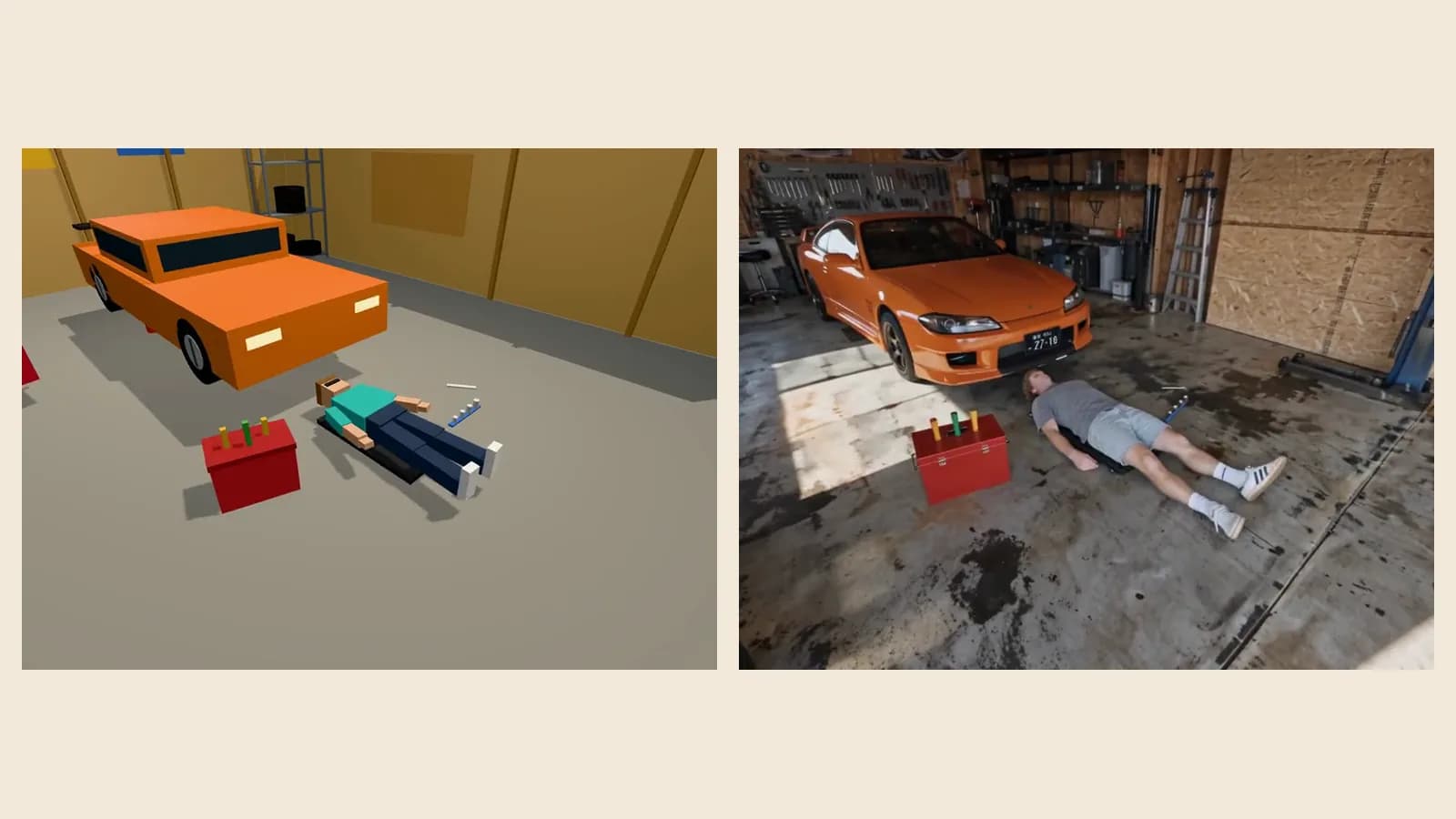
Two examples the Klakix team made with 3D Scene; blockout on the left, result on the right. The courier scene uses a hero angle, tracking and a drone rise; the garage scene uses low side tracking and, after a hard cut, a fast robotic-arm swing down.
Common questions
What are the basic camera movements?
The basic camera movements are the pan (turning left or right in place), the tilt (turning up or down in place), the dolly (moving toward or away from the subject), tracking (following a moving subject), the truck (sliding sideways), the crane or boom (rising and lowering) and the orbit or arc (circling the subject). A zoom is a lens move; the dolly zoom combines the two.
What are the main camera angles?
The most common camera angles are eye level, low angle, high angle, bird's-eye view, the Dutch angle, over the shoulder and point of view (POV). An angle describes where the camera sits and where it looks; a movement is that position changing during the shot.
What's the difference between a pan and a tilt?
In both, the camera stays in place and only turns. A pan turns horizontally, left or right (the word comes from panorama); a tilt turns vertically, up or down. Sweeping across a landscape is a pan; showing a tall building from the ground up is a tilt.
What's the difference between a dolly and a zoom?
In a dolly the camera itself moves toward or away from the subject, so the relationship between foreground and background (perspective) changes and the viewer feels like they're moving through the space. In a zoom the camera stays put and only the focal length changes; the image just gets bigger and feels flatter and more artificial.
What is a dolly zoom (the Vertigo effect)?
A dolly zoom moves the camera toward the subject while the lens widens (or the other way round). The subject stays the same size in the frame while the background stretches or squeezes, which feels like shock or vertigo. It's also called the Vertigo effect because Alfred Hitchcock made it famous in Vertigo (1958).
What is a tracking shot?
A tracking shot follows a moving subject at the same speed, from behind, from the side or from the front. It takes the viewer along and adds a sense of speed. When the camera travels backwards ahead of the subject, it's called a leading shot.
How do you get camera movement in AI video?
There are two ways. The first is describing the camera in the prompt, shot by shot and with timing; video models don't always follow it. The second is showing the move with a video reference. Klakix's 3D Scene makes that reference for you: the camera moves inside a 3D blockout, and the model is told to copy it exactly.
Learn more: 3D scene to video
Can you use more than one camera move in a shot?
You can, but it tires the viewer; in professional work each shot has one main move, and a cut comes when the move changes. In short videos, two or three shots in 8 seconds, each with a single move, is plenty.
Don't describe the move, build it
In 3D Scene the camera really moves inside the blockout. Open a ready-made blockout and try all 16 moves for free.
Open 3D Scene