3D Scene · Beta

AI cinematic video generator: direct the camera in a 3D scene

3D Scene is a Klakix tool that builds your scene as a 3D blockout first. Describe it and the AI lays it out in simple blocks; you pick from 16 cinematic camera moves and time each shot to the second. Seedance 2.5 Reference then renders a realistic video with the same camera. An 8-second 480p video costs 109 credits.

Opening the ready-made blockouts and trying the camera is free.

3D blockout
Final video

In short

3D Scene by the numbers

3D Scene is where you build a scene as a 3D blockout from plain blocks, direct the camera there, and then turn it into a realistic video. Every price below comes from today's catalog.

Length
4 to 30 seconds per scene (up to 20 seconds in 1080p)
Aspect ratio
16:9, 9:16, 1:1, 4:3, 3:4, 21:9
Camera
16 ready-made moves, lens and speed curve per shot, handheld shake, or set the angle by hand
Start
Four ready-made blockouts open for free, or describe your own scene
Blockout
Built by AI in about 1 to 4 minutes; you pay what it actually costs, at most 28 credits for 8 seconds
Look
For each element: an AI reference sheet (5 credits), a photo, or text only
Video
Seedance 2.5 Reference, 8 seconds: 109 credits in 480p, 246 in 720p, 611 in 1080p
Render time
Our examples were ready in 155 to 177 seconds
Status
Beta: if a video fails, the credits are refunded automatically

Made by us

Real examples: from blockout to video

The Klakix team made these videos with 3D Scene on October 29, 2026. Blockout on the left, result on the right; Play both starts them together. Each example lists its settings, its cost and the brief the model received.

3D blockout
Final video

Example 1 · October 29, 2026

Night courier on a rainy Istanbul street

A courier on a motorbike rides down wet cobblestones toward the camera and passes right beside it. No reference images at all: the model got only the blockout and the brief the system wrote.

Made by the Klakix team with 3D Scene, using the same steps you get in the app.

Start
A ready-made blockout, opened for free
Video settings
Seedance 2.5 Reference · 480p · 8 s · 9:16 · ambient sound on
Look
No sheets drawn and no photos uploaded: the courier, the bike and the street were described in text only.
Render time
177 seconds
Cost at today's prices
109 credits ($3.96–$7.27). The blockout was ready-made, so building it cost nothing.

Camera plan

  1. 0–3 sHero angle: looks up from the ground as the courier passes right by the lens
  2. 3–6 sTracking: cuts behind the bike and swings to its side as it follows
  3. 6–8 sDrone rise: climbs and pulls away to reveal the whole street
The brief sent to the model, word for word (written by the system)
IMAGE / VIDEO REFERENCE MAP
• @Video1 (3D blockout, 8s) → motion, staging and camera reference: where everything stands and moves, and the camera above all. Reproduce every camera move of @Video1 with the same direction, speed, distance and lens, and the exact timing of each cut; never turn a moving shot into a static one. Smooth subject motion into physically plausible movement. Do not copy its flat colours, boxy shapes or untextured look.
• Environment (no image): a narrow, steep-walled old Istanbul street at night in heavy rain, wet glossy cobblestones reflecting warm street lamps and shop window…. Layout follows @Video1.
Also in the scene: rain puddles on the cobblestones reflecting the lights (the cyan block); a red mid-size delivery motorbike with a bright headlight, wet and glistening in the rain (the red block bike); a delivery courier in a bright orange rain jacket with reflective stripes, dark navy waterproof trousers, black boots and a full-face… (the orange block figure).
ACTION: At night in heavy rain, a courier on a red motorbike with a teal delivery box rides down a narrow cobblestone street in old Istanbul, headlight glaring toward a low ground-level camera (0–3 s), and passes right beside it at about 2.8 s. At 3 s a hard cut…
SHOTS: 0–3s: low-angle hero shot from near the ground looking up at the orange block figure, slowly pushing in…. 3–6s cut: tracking shot following the red block bike from behind, gradually swinging around to its side as…. 6–8s cut: drone shot rising up and pulling away from the orange block figure, revealing the whole location….
LOOK: photorealistic live-action footage shot on 35mm film, natural lighting, realistic textures, subtle film grain. It is night: practical lights and cool moonlight, not daytime.
3D blockout
Final video

Example 2 · October 29, 2026

Mechanic in a Japanese garage

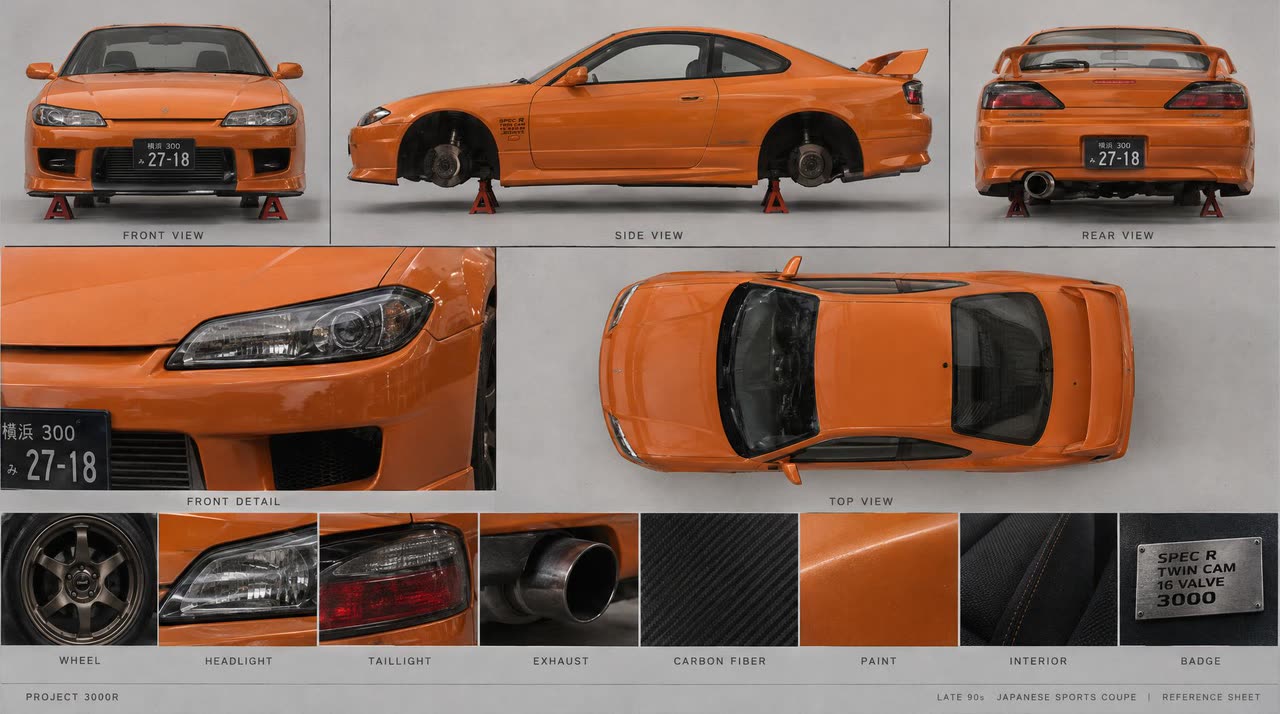
A mechanic rolls out on a creeper from under an orange coupe on jack stands. The car got an AI-drawn reference sheet; the mechanic was described in text only.

Made by the Klakix team with 3D Scene, using the same steps you get in the app.

Start
A ready-made blockout, opened for free
Video settings
Seedance 2.5 Reference · 480p · 6 s · 4:3
Look
Two AI reference sheets were drawn, one for the coupe and one for the garage; the mechanic was described in text (hair, tee, shorts, sneakers).
Render time
155 to 166 seconds (two runs)
Cost at today's prices
92 credits ($3.34–$6.13): 82 for the video + 2 sheets × 5. The blockout was ready-made, so building it cost nothing.

Camera plan

  1. 0–5 sLow side tracking: wide lens at floor level, following the mechanic as he rolls out
  2. 5–6 sHard cut: a fast robotic-arm swing down from a high front-left angle

Reference sheets drawn for this video (2)

Vehicle sheet: front, side, rear, top and details

The sheet shows the model what the car looks like from every side; the blockout only tells it where the car is.

The brief sent to the model, word for word (written by the system)
IMAGE / VIDEO REFERENCE MAP
• @Video1 (3D blockout, 6s) → motion and staging reference only: where everything stands and moves, every camera position and lens, and the exact timing of each cut. Follow its intent, not its exact keyframes; smooth all movement into continuous, physically plausible motion. Do not copy its flat colours, boxy shapes or untextured look.
• @Image1 (vehicle sheet) → an orange late-90s Japanese sports coupe with sleek headlights and a rear wing, lifted on red jack stands; this is the orange block car in @Video1.
• @Image2 (location) → environment style reference, not the exact layout: a small Japanese tuning garage with timber stud walls and OSB panels, exposed roof joists, Japanese tuning banners, a pegboard tool wall, metal shelving with stacked tyres and an oil-stained…. Layout follows @Video1.
Also in the scene: four red jack stands under the car (the red block); a low black mechanic's creeper on small caster wheels (the dark grey block); a young mechanic with curly light-brown hair, a grey tee and light-wash denim shorts, white socks and white retro sneakers (the teal block figure); a red steel toolbox with colourful screwdriver handles sticking out of the top (the red block).
ACTION: A mechanic lies on a creeper under the front of a lifted orange coupe working with his arms raised, then rolls out feet-first and lets his arms drop; at 5 seconds a hard cut to a high front-left angle.
SHOTS: 0–5s: low side angle at floor level with a wide 18mm lens, framing the mechanic's upper body as he rolls out from under the front of the car…. 5–6s cut: hard cut, then a rapid robotic-arm move swinging down from a high front-left angle toward the mechanic, wide 20mm lens.
LOOK: photorealistic live-action footage shot on 35mm film, natural lighting, realistic textures, subtle film grain. Lighting is natural daytime, not night.
Mechanic described in text
With a stylized character sheet

Same blockout, two ways to give the character

Faces: text or a stylized sheet

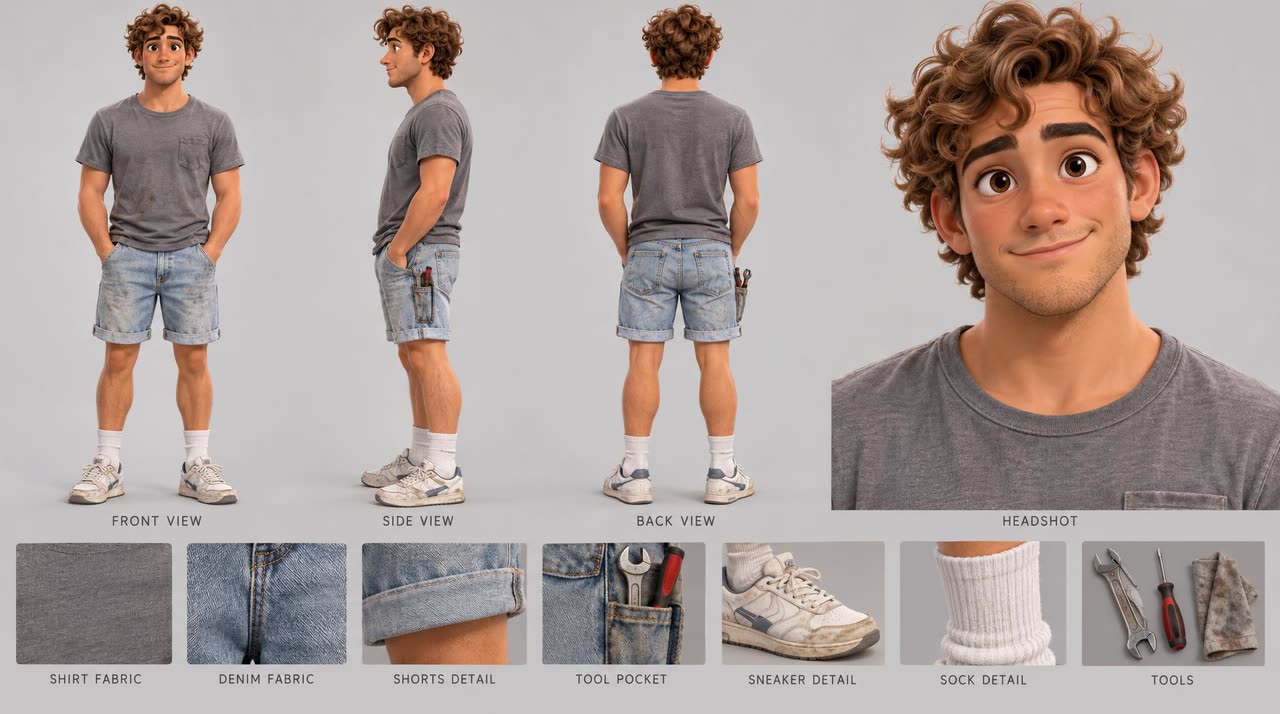
As a test, we rendered the garage scene a second time with the same blockout and settings, this time giving the mechanic a 3D-animation-style character sheet. The model accepted it, and the video still came out photorealistic. Each method was tried once, so treat it as a single data point.

A realistic character sheet, by contrast, was rejected by the video model even though it was AI-drawn. So in the app, people in a realistic scene go to the model as text (or as one of your saved fictional characters, sent as text). Character sheets can be drawn when the scene uses a stylized look, such as 3D animation or anime.

Stylized character sheet of the mechanic: front, side and back views and clothing details
The stylized sheet used in the second run

How it works

From blockout to video in four steps

  1. Describe your scene

    Write the place, who does what and what the camera does when, or open one of four ready-made blockouts. The AI builds the scene as a 3D blockout from simple blocks, and you can fix it by typing.

  2. Direct the camera

    Give each shot one of 16 ready-made moves, or set them all in one click with Direct it cinematically. Drag the cuts on the timeline and pick the lens and speed curve. This step is free.

  3. Pick the look

    Choose the style and lighting. Draw AI reference sheets or upload photos for vehicles, products, animals and places; describe characters in text.

  4. Render the video

    The blockout is recorded in your browser and sent to Seedance 2.5 Reference. The model takes motion and camera from the blockout and the look from your references; the result opens next to the blockout.

Camera

16 camera moves, one per shot

Give each shot a move, a subject, a side and a strength. Direct it cinematically sets fitting moves for the whole scene in one click: a dive or crane to open, tracking or an orbit in the middle, a reveal to close. Try another take or undo, all for free.

  1. Push inGlides from wide to close
  2. Pull backStarts close, pulls back to reveal the place
  3. OrbitArcs around the subject
  4. TrackingFollows from behind, swings to the side
  5. LeadingTravels backwards ahead of the subject
  6. TruckSlides sideways with parallax
  7. Crane upRises from the ground to look down
  8. Crane downBooms down from high to eye level
  9. Hero angleLooks up from the ground while pushing in
  10. FPV diveDives fast from high and swoops in
  11. Drone riseRises and pulls away to reveal the place
  12. Top-down spinLooks straight down, turning as it lowers
  13. Dolly zoomVertigo: the subject holds, the background stretches
  14. Crash zoomSnaps the zoom in from a fixed spot
  15. Whip panWhips from one subject to another
  16. StaticLocked-off, no movement

The camera doesn't clip into walls in a narrow street, doesn't lose the subject behind an obstacle and stays under the ceiling indoors; a rider on a motorbike is framed together with the bike. Our camera movements guide explains when each move works, with examples.

Look

A reference sheet, a photo, or just text

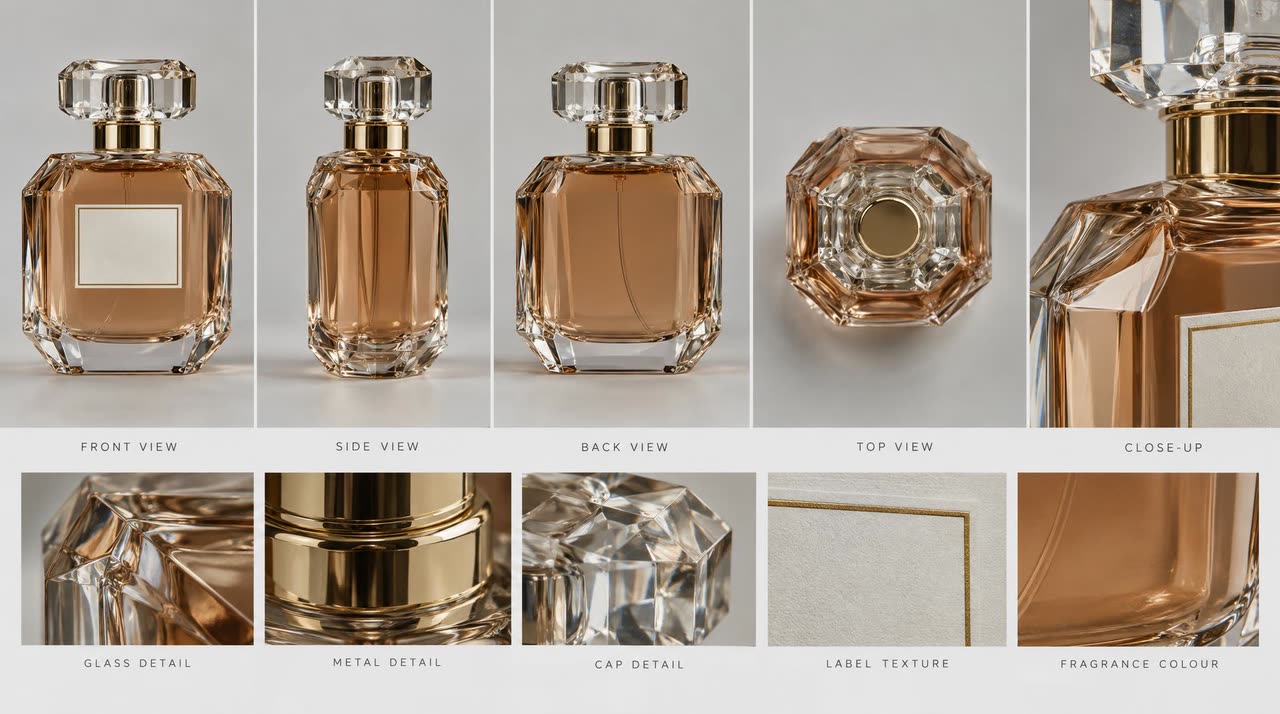
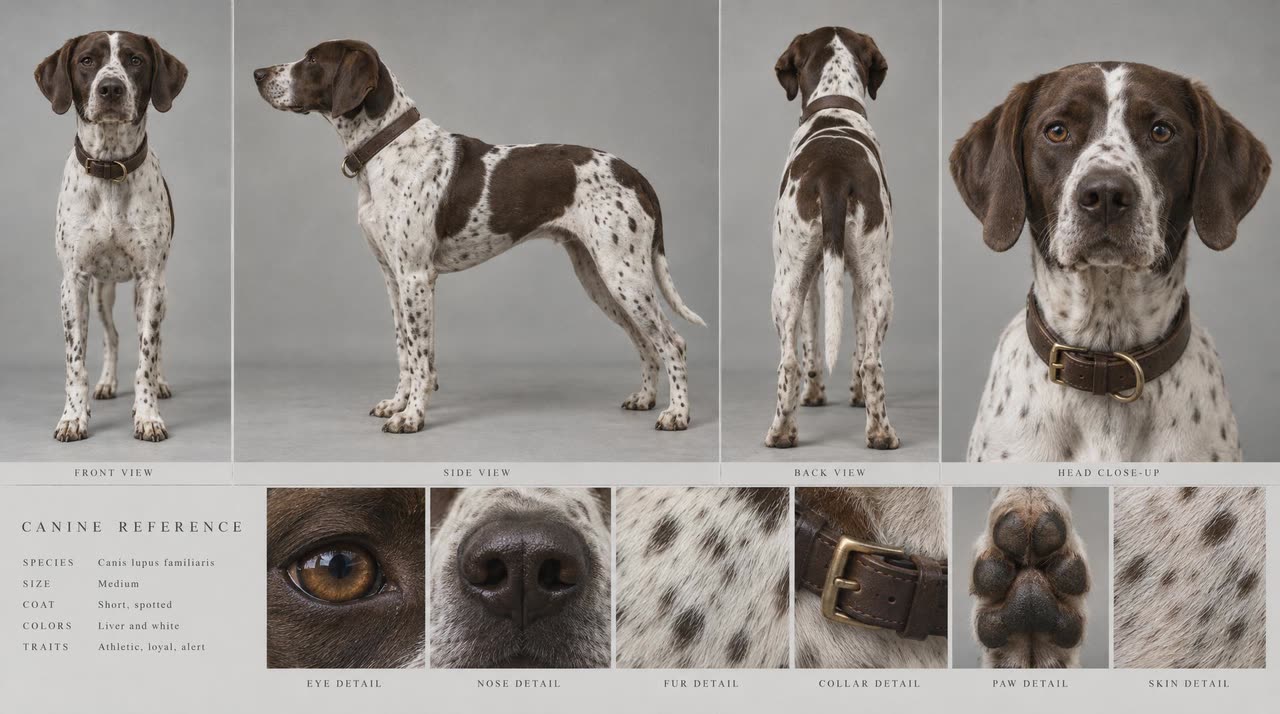
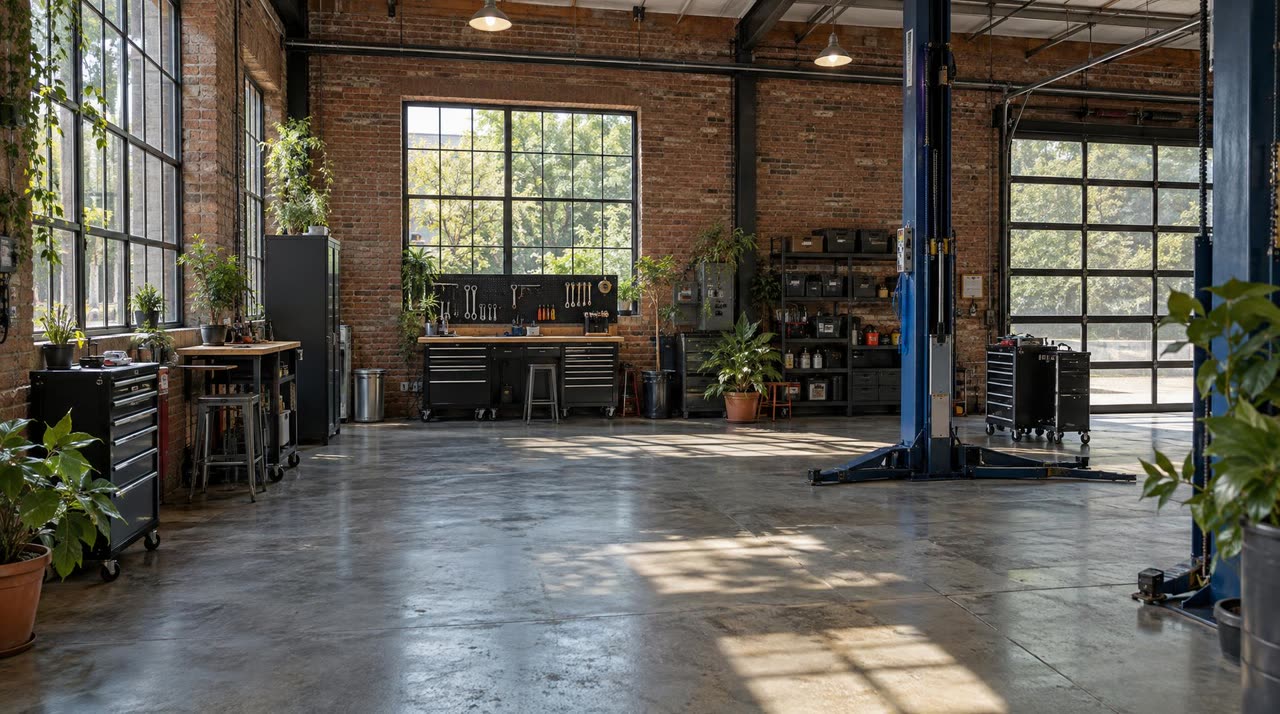
The blockout says where things are; you decide how they look. For each element, draw an AI reference sheet (5 credits), upload a photo, or leave it as text. The sheets below were drawn with GPT Image 2.5 in the look step.

  • Orange sports coupe from the front, side, rear and top, with wheel, headlight and exhaust details
    Vehicle
  • Perfume bottle from four angles with glass, metal cap and label details
    Product and prop
  • Spotted pointer dog from the front, side and back with eye, nose and fur details
    Animal
  • 3D-animation-style mechanic with curly hair from the front, side and back, with clothing details
    Character (stylized)
  • A bright brick-walled repair workshop with large windows and a car lift
    Location

People work differently: the video model rejects photos with realistic faces and realistic character sheets. So in a realistic scene you describe the character in text (age, hair, clothes); character sheets can be drawn when the scene uses a stylized look such as 3D animation or anime. Your choices are turned into an English brief for the model.

Pricing

How much does 3D Scene cost?

The camera and timing are free; credits go to building a blockout, drawing reference sheets and rendering. The exact cost is shown on every button. Dollar amounts depend on the pack size; packs start at $5 for 75 credits.

StepCost
Opening a ready-made blockoutFree
Camera, timing and cutsRuns in your browserFree
Building a blockout from your textWhat the AI actually used, at least 10. Cap for 8 / 15 / 30 seconds: 28 / 41 / 69; the rest is refunded. Simple 8-second scenes cost us 15 to 19 credits.Up to 28 credits
Editing the blockout by typingSame rule; the cap is 6 credits higher because the current scene goes in tooUp to 34 credits
AI reference sheet (GPT Image 2.5)Per sheet5 credits
Video, Seedance 2.5 Reference, 8 seconds, 480p$3.96–$7.27109 credits
Video, Seedance 2.5 Reference, 8 seconds, 720p$8.93–$16.40246 credits
Video, Seedance 2.5 Reference, 8 seconds, 1080p$22.19–$40.73611 credits
Video, Seedance 2.0 Reference, 8 seconds, 480p70 credits
Video, Seedance 2.0 Mini Reference, 8 seconds, 480p36 credits

Packs and plans are on the pricing page. Start at 480p; once the camera and timing feel right, move up to 720p or 1080p.

Terms

Blockout, previs, storyboard: what's the difference?

3D blockout
A rough version of the scene built from flat-colored blocks. It shows who stands where, how things move and the path of the camera, with no textures or detail.
Previs
Previsualization: trying out a scene and its camera in a simple 3D draft before the real shoot. It's standard in film, advertising and games.
Storyboard
A frame-by-frame sketch of the scene. It doesn't show camera movement or timing; previs and a 3D blockout do.
Reference sheet
An image that shows a vehicle, product or place from several angles with close-up details. It teaches the video model what the thing looks like.
Reference map
The opening of the brief sent to the model: it says what the blockout video (@Video1) and each image (@Image1…) stand for, in order.

Who it's for

What people use 3D Scene for

Product and ad videos
An orbit around the product, a slow push in toward the cap, a cut to a detail. The ready-made perfume blockout is set up for exactly this.
Vehicles and action
Tracking, leading shots, a drone rise: a camera that moves with a fast subject, like the courier example.
Short films, music videos, trailers
Cuts timed to the second, a separate lens for every shot. Try the scene as a blockout first, then render it.
Film and ad crews
As previs: test the camera plan before the shoot and show the client a moving draft instead of a storyboard.
Social media
Vertical 9:16 scenes that open on movement in the first second, for Reels, TikTok and Shorts.

Highlights

Why 3D Scene

The camera actually moves

The camera isn't described in a prompt; it moves inside the blockout, and the model is told to copy that move with the same direction, speed, distance and lens.

Cuts to the second

Drag the cuts on the timeline and pick the lens, speed curve and handheld shake for each shot.

The brief writes itself

What each color stands for, every shot and the lighting go into a reference map. You can open and read it before you send it.

Try it for free first

Opening the ready-made blockouts and setting the camera and timing are free. Credits go only to building a blockout, drawing sheets and rendering.

Pay for what it actually uses

Building a blockout shows its cap up front; when the job ends, the real cost is charged and the rest is refunded right away.

Result next to the blockout

When the video is done, it opens next to the blockout, so you can play both and see whether the camera followed the plan.

Honest limits

What 3D Scene can't do

  1. It's in beta: the result may not always follow the blockout exactly, especially in fast or complex moves where the model adds its own interpretation. If a video fails, your credits are refunded.
  2. Realistic human faces can't be used as references: the video model rejects photos of people and realistic character sheets. People are described in text, and celebrities or real people without consent aren't generated.
  3. It doesn't render readable text, logos or brands on screen; the brief rules them out on purpose. Add any text to the video afterwards.
  4. One scene is up to 30 seconds (20 in 1080p). There's no editor to join several scenes into one film.
  5. The blockout is made of simple blocks: fine hand movements, facial expressions, fight or dance choreography can't be staged in it; the text of the brief carries those.
  6. No dialogue or lip sync. Ambient sound can be turned on; for a talking person, Talking photo is the better tool.

FAQ

Common questions

How do you turn a 3D scene into a video with AI?

3D Scene has four steps: describe your scene or open a ready-made blockout, and the AI builds it as a 3D blockout from simple blocks; give each shot a camera move; pick the look; then the blockout goes to Seedance 2.5 Reference, which renders a realistic video with the same camera. You don't need to know any 3D software, and it all runs in the browser.

How do you control camera movement in AI video?

A camera move described in a text prompt doesn't always come through. In 3D Scene the camera really moves inside the blockout: pick one of 16 ready-made moves and set its subject, side and strength, or let Direct it cinematically set moves for the whole scene in one click. The model is told to copy that camera with the same direction, speed and lens.

Learn more: Camera movements guide

Do the blocks from the blockout show up in the video?

No. The blockout only shows who stands where, how things move and what the camera does. What each color stands for is written into the brief automatically, so the boxes and flat colors never appear in the result.

Which video model does 3D Scene use?

The default is ByteDance's Seedance 2.5 Reference: it takes the blockout video as the reference for motion and camera, and the drawn sheets or uploaded photos as the reference for the look. Seedance 2.0 Reference and Seedance 2.0 Mini Reference are there for cheaper tests.

Learn more: Seedance models

How much does 3D Scene cost?

Opening a ready-made blockout and setting the camera and timing are free. Building a blockout from text costs what it actually uses (at most 28 credits for 8 seconds), a reference sheet is 5 credits, and an 8-second Seedance 2.5 Reference video is 109 credits in 480p ($3.96–$7.27) or 246 in 720p. If a video fails, the credits are refunded.

Can I try 3D Scene for free?

Signing up is free. You can open the four ready-made blockouts and try the camera, cuts and lenses at no cost. Building a blockout from text, drawing sheets and rendering need credits; packs start at $5 for 75 credits.

Can I use my own photos or my face?

You can upload photos or draw AI reference sheets for vehicles, products, animals and places. For people, realistic face photos and realistic character sheets can't be used: the video model rejects them. Describe the character in text (age, hair, clothes) or pick one of your saved fictional characters.

How long does a video take?

The AI usually builds the blockout in 1 to 4 minutes. Rendering our example videos took 155 to 177 seconds; it varies with resolution and queue. You can leave the page; the video shows up in the studio when it's done.

How long can a video be?

With Seedance 2.5 Reference a scene can be 4 to 30 seconds long, up to 20 seconds in 1080p. Seedance 2.0 Reference and Mini top out at 15 seconds. For a longer film, render the scenes one by one and join them in a video editor.

Is 3D Scene an AI previs tool?

Yes, it works as previs: you test the camera plan and timing on a 3D blockout before anything is shot. The difference is that the same blockout can be turned straight into a realistic video, so a film or ad crew can show the client a moving draft.

Build the scene, direct the camera

Signing up is free, and you can open the ready-made blockouts and try the camera at no cost. Building a blockout and rendering need credits; packs start at $5 for 75 credits. No subscription needed.

Open 3D Scene