Guide · Setup checked November 10, 2026
Make AI videos in ChatGPT
ChatGPT plans the video with you. The Klakix plugin renders it with Veo, Kling or Seedance and hands you the file in the same conversation.
Server URL
https://klakix.com/api/mcpThe short answer
Can ChatGPT make videos?
Not inside the chat. ChatGPT writes scripts and prompts and generates images, but it doesn't render video in the conversation. Most “ChatGPT video generator” results are separate video apps that borrow the name. This page is about something narrower: making the video without leaving ChatGPT.
ChatGPT supports custom plugins built on MCP, an open standard for connecting assistants to outside tools (see OpenAI's guide). Add Klakix as one and ChatGPT gets tools such as generate_video, generate_image and generate_audio. It writes the prompt, picks the model and settings you asked for, and returns the clip.
| You want | ChatGPT alone | With Klakix |
|---|---|---|
| A script, shot list or prompt | Yes | Not needed |
| An image | Yes, with its own image model | Also Nano Banana 2, GPT Image 2.5, and Muse Image |
| A video clip with sound | No | Kling 4.0, Seedance 2.5, Google Veo 3.1 Lite, Wan 3.0 and more |
| A change to what's in a clip you have | No | Kling 4.0 Video Edit and Seedance 2.5 Video Edit |
Setup
Add the plugin to ChatGPT
You add it on chatgpt.com in a browser. You log in to your account during setup, so there's no API key to copy.
Open Plugins
In ChatGPT on the web, go to Plugins (chatgpt.com/plugins), click + and choose Add custom MCP server.
Add the server
Name it Klakix, paste https://klakix.com/api/mcp as the server URL and choose OAuth. Confirm the warning (I understand and want to continue), click Create as a plugin and install it, then log in to Klakix and approve access.
Call it with @
In a chat, type @, pick Klakix and ask, for example: “Make an 8-second video of a ferry crossing a harbor at blue hour, with sound.”
Business, Enterprise and Edu have full support for custom MCP servers; in a workspace an admin may need to allow it first. On Plus and Pro, OpenAI's documentation isn't consistent about tools that create things, so if Add custom MCP server doesn't appear, your plan doesn't include it yet. You can see and remove the connection anytime on the MCP page in the studio.
Examples
Real prompts, real clips
Each clip is a real output from the prompt shown, made with the model and settings shown in the Klakix studio; the plugin calls the same models. Press play for sound. Paste a prompt like these into ChatGPT, or describe the shot and let ChatGPT write it. Prices are today's rates.
Opening shot with ambient sound
An aerial at blue hour, in 1080p, the kind of opener a brand video needs.
Google Veo 3.1 Lite · 8 sec · 16:9 · 1080p · 64 credits ($2.32–$4.27)
Prompt
Cinematic aerial shot over the Bosphorus in Istanbul at blue hour. The suspension bridge lights flicker on, a white ferry cuts across the dark water leaving a glowing wake, city lights twinkling on both shores. Slow forward drone glide. Anamorphic lens with subtle horizontal flares, teal and amber color grade, light haze. Clean modern digital cinema look, crisp and sharp, no film grain, no vignette, no frame borders, no scratches or dust. Ambient sound: distant ferry horn, seagulls, soft city hum.
Tool:
generate_videoVertical social clip
A close-up that works as a Reel or a TikTok, from one sentence.
Seedance 2.0 · 5 sec · 9:16 · 720p · 95 credits ($3.45–$6.33)
Prompt
Close-up of a barista pouring milk into an espresso cup, latte art rosetta forming in the crema, steam rising, warm cafe light, hands only, slow motion, photorealistic product commercial
Tool:
generate_videoA longer, 10-second scene
One tracking shot that keeps going, with gulls and waves.
Wan 3.0 · 10 sec · 16:9 · 720p · 100 credits ($3.63–$6.67)
Prompt
Cinematic tracking shot along the Galata Bridge in Istanbul at sunset. A row of fishermen cast their rods over the railing, fishing lines glinting in the golden light, one of them reels in a small fish. The silhouette of the New Mosque and passing white ferries in the background, seagulls gliding overhead. The camera glides slowly along the bridge. Warm golden hour color grade, natural realistic motion, photorealistic. Sound: seagulls, gentle waves, a distant ferry horn, soft city ambience.
Tool:
generate_video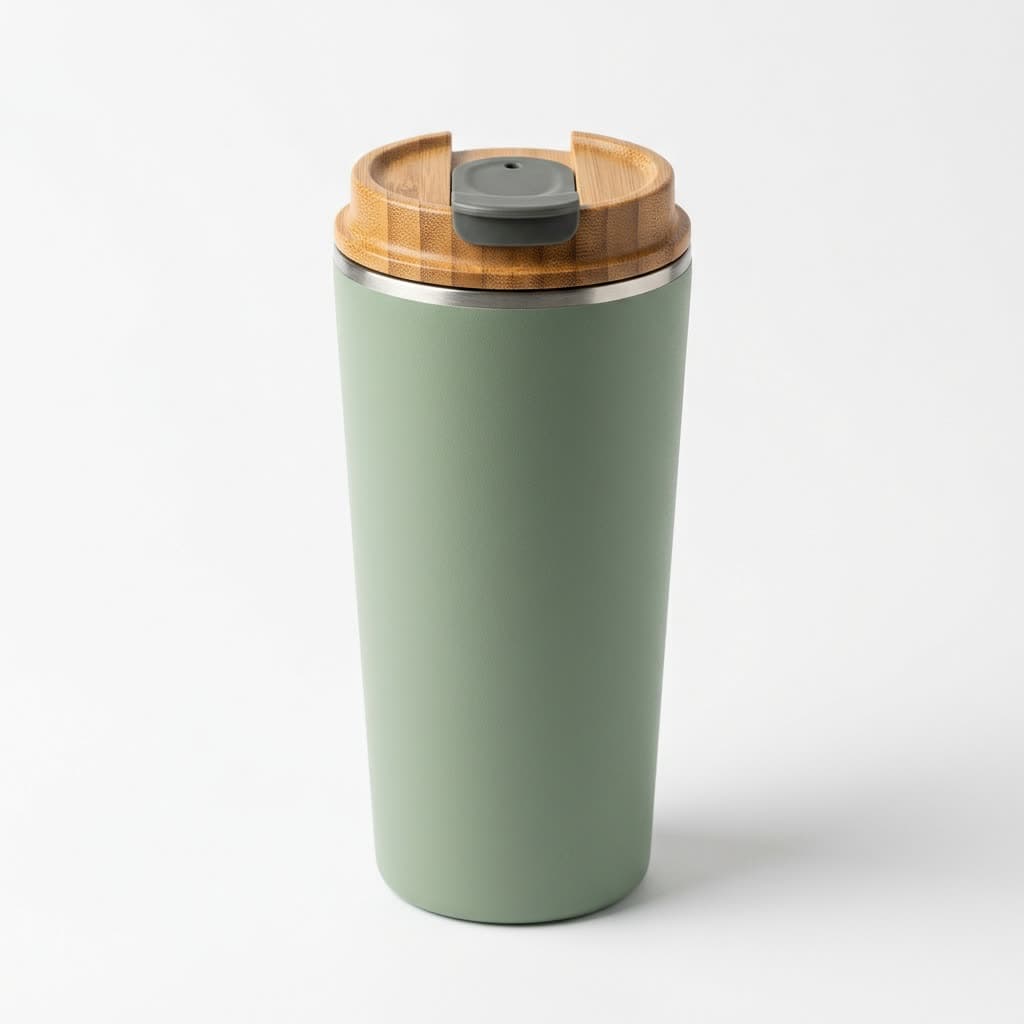 Photo used
Product photo to store video
The cheapest Seedance turns a packshot into a turntable clip.
Seedance 2.0 Mini · 5 sec · 1:1 · 720p · 48 credits ($1.74–$3.20)
Prompt
The sage green travel mug slowly rotates on the clean white studio background, soft light gliding over its matte surface and the bamboo lid, subtle reflection on the floor, clean e-commerce product video, no people, no text.
Tool:
generate_video Photo used
Portrait to video
A photo of a person, animated with sound. Seedance doesn't accept real faces, so this one is Kling.
Kling 4.0 · 5 sec · 1:1 · 720p · 79 credits ($2.87–$5.27)
Prompt
The baker turns to the stone oven behind him, slides a long wooden peel inside and pulls out a row of golden crusty loaves, steam rising in the warm morning light. He sets them on the wooden shelf, dusts the flour off his hands and looks back at the camera with a warm, proud smile. Gentle handheld camera, realistic natural motion. Sound: the crackle of the oven, the scrape of the peel, soft bakery ambience. No dialogue, no music.
Tool:
generate_videoOriginal Edited Restyle a video you already have
The same apartment walk-through, now a Scandinavian living room at golden hour; the room layout and camera move stayed the same.
Kling 4.0 Video Edit · 5 sec, same as the original · 16:9 · 720p · 96 credits ($3.49–$6.40)
Prompt
Edit @Video1. Restyle the apartment interior into a cozy Scandinavian living room at golden hour: light oak floor, a soft linen sofa, a wool rug, several green potted plants and warm table lamps that are switched on, with low warm sunlight coming through the windows. Keep the exact same room layout, window positions and camera movement as in @Video1. No people, no text, no logos.
Tool:
generate_video
Models
Which model to ask for
ChatGPT can choose for you, but naming the model gets you exactly what you pay for. Prices below are for the example setting; longer and sharper clips cost more.
| You want | Ask for | Example setting | Credits |
|---|---|---|---|
| Try an idea as cheaply as possible | MiniMax H3 Max Turbo | 5 sec, 768p | 20 ($0.73–$1.33) |
| A short social clip with sound | Seedance 2.0 Mini | 5 sec, 720p | 48 ($1.74–$3.20) |
| A scene with dialogue or ambient sound | Google Veo 3.1 Lite | 8 sec, 720p | 40 ($1.45–$2.67) |
| Your product photo in a new setting | Seedance 2.5 Reference | 5 sec, 720p | 116 ($4.21–$7.73) |
| A video from a photo of a person | Kling 4.0 | 5 sec, 720p | 79 ($2.87–$5.27) |
| One long single shot | Wan 3.0 | 30 sec, 720p | 300 ($10.89–$20.00) |
| The most realistic picture | Google Gemini Omni Flash | 5 sec, 720p | 50 ($1.82–$3.33) |
| A cinematic, ad-film look | Seedance 2.5 | 5 sec, 720p | 147 ($5.34–$9.80) |
| A change to a video you already have | Kling 4.0 Video Edit | 5-sec original, 720p | 94 ($3.41–$6.27) |
ChatGPT can look up every model and price with list_models and check a request with estimate_cost before it starts. The full model list is on AI video models.
Pricing and limits
What it costs, what to expect
Connecting is free. Each video uses credits from your Klakix account at the same price as on the website, from 20 credits ($0.73–$1.33) for a 5-second MiniMax H3 Max Turbo clip. Your ChatGPT subscription doesn't pay for them, and Klakix credits don't pay for ChatGPT.
Credit packs start at $5 for 75 credits and never expire, and you don't need a Klakix subscription. Failed generations are refunded automatically.
Security, permissions and the other apps are on the Klakix MCP server page.
- If you only say “make an image”, ChatGPT may use its own image model, which doesn't use your Klakix credits. Type @ and pick Klakix when you want a Klakix model.
- Custom plugins are added on chatgpt.com in a browser. In a workspace, an admin may need to allow them, and workspace security settings, including Lockdown, still apply.
- ChatGPT can ask you to confirm before it runs a tool that creates something. That's its own safety step; approve it to start the video.
- A video takes minutes (about 1 to 4 by the catalog's estimates). ChatGPT checks back with get_generation, up to 50 seconds per check; if it stops waiting, ask whether the video is ready.
- One shot runs up to 30 seconds. Photos and clips have to reach the plugin as a public link, a file Klakix made earlier, or a small image (up to 15 MB) that ChatGPT passes along; clips can be up to 30 seconds and 50 MB.
- When a photo shows a person, the plugin asks for consent first: the person has to be you or someone who agreed.
FAQ
Common questions
Can ChatGPT make videos?
Not in the chat by itself. ChatGPT can write a script and a prompt and it can generate images, but it has no video model in the conversation. Add Klakix as a custom MCP plugin and ChatGPT can generate videos with Veo, Kling, Seedance and other models, then bring the finished clip back to the chat.
Which ChatGPT plans can add it?
OpenAI documents full support for custom MCP servers, including tools that create things, on Business, Enterprise and Edu, where a workspace admin may need to allow it. On Plus and Pro, OpenAI's pages don't agree on whether those tools are available. If you don't see Add custom MCP server on the Plugins page, or ChatGPT can't run the generation tools, your plan doesn't include them yet.
Is it safe to add a custom MCP server?
ChatGPT warns you before you add any custom server, and it can ask you to confirm before a tool runs. Klakix uses OAuth: you log in on Klakix's own page and approve two permissions, so ChatGPT never sees your password. You can remove the connection anytime on the MCP page in the studio, and generations follow the same content rules as the website.
Learn more: Security and permissions
Do I need an API key?
No. ChatGPT connects by logging in to your account (OAuth). API keys are only for tools without OAuth, such as n8n or your own scripts; you create one on the MCP page in the studio, and it's shown only once.
Does it work on mobile?
Add it on chatgpt.com in a browser; OpenAI documents the setup for ChatGPT on the web. Every video is saved in your Klakix library, which you can open on any phone.
How much does a video cost? Is it free?
Connecting is free; generating isn't. Each video uses credits from your Klakix account at the same price as on the website, from 20 credits for a 5-second MiniMax H3 Max Turbo clip. There's no free tier for video and no subscription needed: credit packs start at $5, and failed generations are refunded. ChatGPT can check a price with estimate_cost before it starts.
More guides
Other apps and jobs
- MCP · All appsKlakix MCP serverEvery app you can connect, every tool, security and how credits work.
- Claude · VideoClaude video generationThe same video models in Claude, with a guide to editing and extending clips.
- Claude · ImagesClaude image generationImage models in Claude, which can't draw pictures on its own.
New to AI video? Start with how to make AI videos, a step-by-step guide with real prompts and costs.
Video in ChatGPT
Sign up, buy any credit pack (from $5) and add the plugin on ChatGPT's Plugins page. Failed generations are refunded.
Connect ChatGPT