Open source · MIT · Python
clipcheck: catch bad AI video generations before you use them
clipcheck is a free, MIT-licensed command-line tool, MCP server and Python library that checks a generated video clip in one local pass and tells you, or your AI agent, whether to keep it, look at it or regenerate it. It measures camera speed, background flicker, frozen frames, unexpected cuts, black frames and letterbox, and audio loudness. It runs locally and needs no API key.
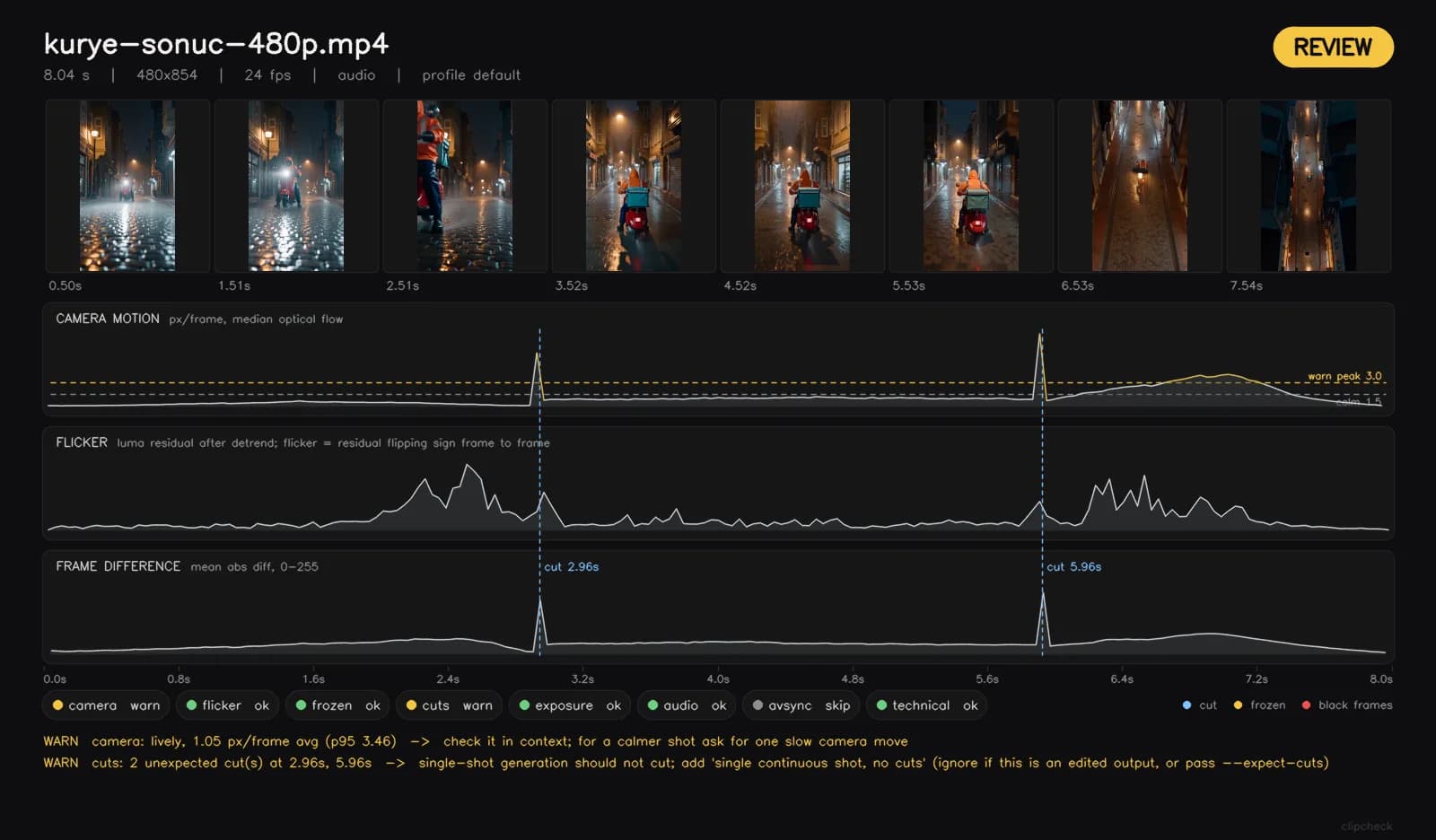
clipcheck sheet: thumbnails along the timeline, then camera motion, flicker and frame-difference curves with the thresholds and the detected cuts marked. It is the quickest way to see what the numbers mean.Why
Why we built it
AI video generation is slow and costs money for every attempt, and the agent that triggered it cannot watch the result. Most rejected clips fail for a small set of reasons, and these are measurable. We run these checks on our own generations at Klakix and open-sourced them so any agent or script can do the same.
The reasons clips get rejected most often
- The camera is too fast.
- The background flickers.
- The clip freezes or is almost static.
- There is a cut where there should be none.
- The audio drifts from the lips.
Install
Install and check a clip
Python 3.9 or newer. ffmpeg and ffprobe on your PATH are recommended for the audio checks and stream metadata.
pip install git+https://github.com/klakix-ai/clipcheckclipcheck check out.mp4
clipcheck sheet out.mp4 -o sheet.pngFor now clipcheck installs from GitHub. According to the README, pip install clipcheck works once the package is on PyPI, and pipx run clipcheck check out.mp4 or uvx clipcheck check out.mp4 run it without installing.
Output
What you get back
A readable verdict for people, and the same result as JSON for agents. One file gives an object, several files or a folder give a list.
out.mp4  REVIEW  8.04s 480x854 24fps audio
  WARN  camera    lively, 1.05 px/frame avg (p95 3.46) -> check it in context; for a calmer shot ask for one slow camera move
  WARN  flicker   local flicker 2.7 in background blocks -> reduce fine texture in the prompt or regenerate; check the contact sheet
  OK    frozen    no frozen frames (0.0% duplicates)
  OK    cuts      single continuous shot
  OK    exposure  no black, blown-out or letterboxed frames
  OK    audio     -24.0 LUFS (-10.0 vs -14 target)
  SKIP  avsync    no stable face found (11% of sampled frames) [experimental]
OK technical 8.04s, 480x854, 24 fps{
"schema_version": 1,
"verdict": "review",
"checks": [
{
"name": "camera",
"status": "warn",
"summary": "lively, 1.05 px/frame avg (p95 3.46)",
"metrics": {"avg_px_per_frame": 1.116, "p95_px_per_frame": 3.731, "px_per_second": 26.78},
"hint": "check it in context; for a calmer shot ask for one slow camera move",
"experimental": false
}
],
"meta": {"duration_s": 8.04, "width": 480, "height": 854, "fps": 24.0, "has_audio": true}
}clipcheck check shots/ --fail-on regenerate # exit 1 if any clip should be regenerated
clipcheck check shots/ --fail-on review --csv report.csv
clipcheck check out.mp4 --profile strict # tighter thresholds for final delivery
clipcheck check edit.mp4 --expect-cuts # the clip is an edit, cuts are intended
clipcheck check out.mp4 --window 3 # also find the calmest 3 s camera windowExit codes
0 normally, 1 when --fail-on matches a clip (review also matches regenerate), and 2 when a file cannot be read.
Metrics
What it measures
Everything comes from a single decoding pass. Any fail gives regenerate, any warn gives review, otherwise keep. These are the default profile thresholds; the strict profile tightens them.
| Check | Method | Thresholds (default) | Verdict |
|---|---|---|---|
camera | Median Farneback optical flow at 160 px width, px/frame | warn if avg > 1.5 or p95 > 3.0 (labels: calm <= 1.0/1.5, lively <= 2.0, too fast above); frames at a cut are ignored | warn at most |
flicker | 8x8 block luma, detrended with a moving median; fast-motion frames excluded | warn if local flicker >= 2 and the residual flips sign on >= 5% of frames; fail if > 4 and >= 30% | warn / fail |
frozen | Mean abs difference between consecutive frames < 0.15 | > 10% duplicates or 0.5 s mid-clip freeze warn; > 90% fail | warn / fail |
cuts | HSV histogram distance > 0.3 and frame-difference spike | any cut (unless --expect-cuts) | warn |
exposure | Black frames, blown-out frames, letterbox bars | > 0.2 s black at start/end, letterbox warn; > 50% black fail | warn / fail |
audio | EBU R128 loudness and true peak (ffmpeg), sample clipping | clipping > 0.1% or true peak > -0.1 dBTP | warn |
avsync | Mouth-region motion vs audio onsets, cross-correlation (experimental) | offset > 120 ms with confidence >= 3 | warn |
technical | Duration, size, VFR, odd dimensions, dropped frames | VFR > 1%, odd size, frame count off by > 2% | warn |
Details, formulas and limits are in docs/metrics.md. The thresholds live in one place, src/clipcheck/thresholds.py.
Agents
Use it with your agent
Three ways in: an Agent Skill that runs the check after every generation, an MCP server, and a Python API.
Claude Code skill
The skill tells the agent to run clipcheck check out.mp4 --json after every generation, read the verdict and fix the prompt from a table that maps each check to wording. It stops after three failed attempts at the same shot.
npx skills add klakix-ai/clipcheck/plugin marketplace add klakix-ai/clipcheck
/plugin install clipcheck@clipcheckMCP server
Tools: check_clip(path, profile="default"), check_clips(paths) and contact_sheet(path, out_path). For Claude Desktop, add the server to claude_desktop_config.json.
pip install "clipcheck[mcp] @ git+https://github.com/klakix-ai/clipcheck"
claude mcp add clipcheck -- clipcheck mcp{
"mcpServers": {
"clipcheck": { "command": "clipcheck", "args": ["mcp"] }
}
}Python API
Call it from your own pipeline. The report has the same shape as the --json output.
import clipcheck

report = clipcheck.check("out.mp4", profile="default")
print(report.verdict)                      # keep | review | regenerate
for c in report.checks:
    if c.status in ("warn", "fail"):
        print(c.name, c.summary, "->", c.hint)
data = report.to_dict()                    # same shape as --json
Looking for rules on how to write the prompt in the first place? The AI Video Skills are free Agent Skills for camera angles, prompts, realism and lip sync.
Limits
Known limits
clipcheck checks signals, not content. It will not tell you the hands look wrong.
The thresholds are a starting point from a small set of real clips, not a benchmark. Tune them for your generator and your taste.
avsync is experimental: frontal faces only, and it skips when it is not confident.
Flicker can be triggered by things that are not flicker, such as an object entering the frame or a light turning on. Look at the contact sheet before regenerating on a flicker warning alone.
Cuts between visually similar shots can be missed.
Not in v0.1: morphing, anatomical errors (hands, limbs), face identity drift and prompt adherence.
On the roadmap: face and identity drift against a reference image, hand and limb artifact heuristics, prompt adherence through an optional vision-language model, and cost per usable second across generators, built on the open AI video pricing dataset.
FAQ
Common questions
Does clipcheck work with Seedance, Kling, Veo or Sora output?
Yes. clipcheck reads a video file, so it works on the output of any generator, including Seedance, Kling, Veo, Sora, Runway, Wan and Luma. It measures signals in the pixels and the audio track, not the model that made them. The thresholds come from a small set of real clips, so tune them for the model you use.
Learn more: AI video models
Does it need an API key or a GPU?
No API key and no account. clipcheck runs locally on your machine and needs only Python 3.9 or newer with NumPy and OpenCV, which run on the CPU. ffmpeg and ffprobe on your PATH are recommended: without them clipcheck still works but skips the audio checks and cannot read stream metadata.
Can it detect bad hands or morphing?
No. Version 0.1 checks signals, not content: camera speed, flicker, frozen frames, cuts, black frames and letterbox, audio loudness and clipping, plus an experimental lip-sync check. Anatomical errors such as hands and limbs, and face identity drift against a reference image, are on the roadmap. Morphing and prompt adherence are not covered yet. Look at the contact sheet before trusting a keep on anything important.
What do keep, review and regenerate mean?
Any check that fails gives regenerate, any warning gives review, and otherwise the verdict is keep. A skipped check, for example audio on a silent clip, never changes the verdict. A review is a prompt to look: a fast camera is fine in an action shot, so read the warning in context.
How do I use it in an agent or a CI loop?
Run clipcheck check out.mp4 --json after every generation and read the verdict. The Claude Code skill does this for you and maps each failed check to a prompt change, and it stops after three failed attempts at the same shot. For scripts and CI, --fail-on review or --fail-on regenerate makes the exit code 1 when a clip matches, and an MCP server and a Python API are included.
Learn more: AI video skills
How reliable are the thresholds?
Treat them as defaults, not a benchmark. The calm-camera numbers come from audience feedback on real AI video productions, and the others from a small set of real clips. Use --profile strict for final delivery, and send false positives and misses with real clips to the GitHub issues, which are the most useful reports.
Got a clip that failed the check? Fix the prompt and run it again. License: MIT. Issues and pull requests are welcome on GitHub.
Regenerate failed clips with any model on Klakix