Guide · 13 min read · Nov 8, 2026
How to write a video script: a template for short videos
To write a video script, pick one goal and one viewer, open with a hook in the first few seconds, cover one message in short spoken sentences, and end with a call to action. At a commonly cited 150 words per minute, a 30-second video holds about 75 words and a 60-second video about 150.
Most guides on how to write a video script are built for film students or big marketing teams. This one is for short social videos: you'll get a words-to-seconds table, a fill-in template with a finished example, current length limits for Shorts, Reels and TikTok, and a prompt for writing a timed script with AI.
Limits come from YouTube Help, Instagram Help as quoted by exemplary.ai (checked September 30, 2026) and speaking-rate data from VirtualSpeech. To skip the writing, Motif Video builds the script and video from a topic.
What is a video script?
A video script is the written plan for everything the viewer hears and sees: the spoken words, the shots, the on-screen text and the call to action, in order and in time. Canva's script guide describes two common formats.
- Single-column (master scene): dialogue comes first, with short action lines between. It suits talking-head videos and anything driven by one speaker.
- Two-column (AV): the left column holds scene, action, camera, B-roll and on-screen text; the right column holds the audio. It suits social videos, ads and anything cut from several shots.
Talking head, voiceover or AI clips: what changes
- Talking head: write for your own mouth. Short lines you can say in one breath, with pauses marked.
- Voiceover over B-roll: the audio column carries the story, and every line needs a matching shot in the visual column. Our B-roll guide covers what to put there.
- AI-generated clips: the visual column becomes a list of prompts, one per beat, and each beat has to fit a fixed clip length. Dialogue matters less than describing the shot.
How many words is a 30-second or 60-second video script?
A 30-second video script holds about 75 words and a 60-second script about 150, based on the commonly cited average of 150 words per minute for US English conversation (National Center for Voice and Speech, via VirtualSpeech). The table converts that rate, plus a slower one, into word budgets.
Video script word counts by length (our math)
| Video length | About words at 150 wpm | About words at 111 wpm (slower read) | What fits |
|---|---|---|---|
| 15 seconds | 37 | 28 | A hook and one point |
| 30 seconds | 75 | 56 | Hook, one idea, payoff, CTA |
| 45 seconds | 112 | 83 | Hook, two or three quick points, CTA |
| 60 seconds | 150 | 111 | A short tutorial or product demo |
| 90 seconds | 225 | 167 | A mini story with proof |
| 3 minutes | 450 | 333 | A full explainer or walkthrough |
Our math from 150 wpm (NCVS via VirtualSpeech) and the 111 wpm median of 32,800 practice presentations (VirtualSpeech). Checked November 8, 2026.
Treat 150 wpm as a starting point, not a rule. In VirtualSpeech's data the median speaker ran 111 wpm, while popular TED Talks averaged 173 wpm. The Speaker Lab puts conversational delivery at 125 to 150 wpm, so time your own read before you lock the word count.
How to write a video script, step by step
Writing a good video script takes seven steps: decide the goal, narrow it to one message, write the hook, budget the beats, write the way you talk, time it out loud, and cut. The flow below builds on HubSpot's eight-step process but adds timing for short video.
- Pick one goal and one viewer: Write down the single action you want (follow, visit, buy, book) and describe one specific person who should take it.
- Boil it down to one message: Finish the sentence "After watching, they'll know that..." in under 15 words. If you need two sentences, you have two videos.
- Write the hook first: Draft the opening line for the first 3 seconds: name the problem, the result or a surprising contrast. Write three versions and keep the sharpest.
- Budget the beats: Split your length into hook, value, payoff and CTA, and give each beat a time and word budget from the table above.
- Write it the way you talk: Use short sentences and contractions, one idea per line, and put each line next to the shot it plays over.
- Read it aloud and time it: Read at your natural pace with a stopwatch, or have an AI voice read it, and note where you stumble or run over.
- Cut to fit: Trim words until the read lands a second or two under your target, and move anything you cut to on-screen visuals.
A video script template for social media you can copy
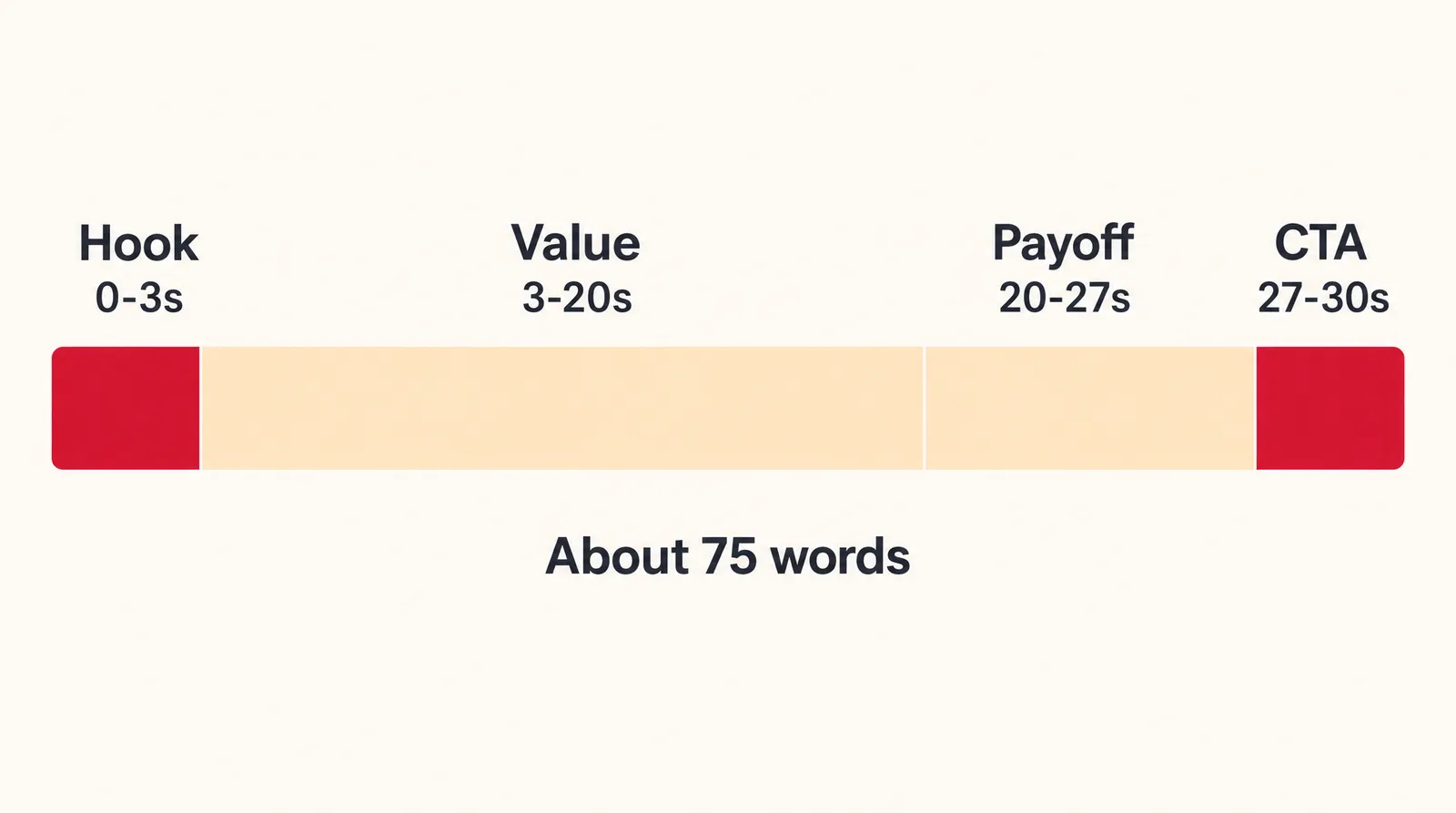
The simplest video script template for social media is a 30-second, two-column table with four beats: hook, value, payoff and call to action. Copy the rows below and replace the brackets; the word budgets assume about 150 wpm.
30-second short video script template
| Time | Visual (what we see) | Audio (what we hear) | Word budget |
|---|---|---|---|
| 0-3 s | [Your most striking shot or your face, close] | [Problem or promise in one line] | About 8 words |
| 3-20 s | [Show the steps, product or process] | [Two or three short points] | About 42 words |
| 20-27 s | [Result, before and after, or proof] | [One payoff line] | About 17 words |
| 27-30 s | [Product or logo shot, on-screen text] | [One clear action] | About 8 words |
Template by Klakix. Word budgets are our math at 150 wpm (NCVS via VirtualSpeech).
Example: a filled-in script for a small business
Here's the template filled in for a fictional coffee shop promoting order-ahead pickup. It comes to about 73 spoken words, which leaves a little room for pauses.
Filled example: Maple Street Coffee (fictional)
| Time | Visual | Audio |
|---|---|---|
| 0-3 s | Close-up: milk poured into a latte, art forming | "Stop waiting ten minutes for your morning latte." |
| 3-20 s | Phone screen with the order form, then a shelf of cups with names written on them | "At Maple Street Coffee, you can order ahead from our website. Pick your drink, pick a pickup time, and pay before you leave home. When you walk in, your cup is on the shelf with your name on it. No line, no waiting." |
| 20-27 s | A customer grabs a cup and walks straight back out the door | "Same latte, same barista, and you're back on the road before your song ends." |
| 27-30 s | Storefront, on-screen text: Order ahead, link in bio | "Order ahead at the link in our bio." |
Sample script written by Klakix for illustration.
This works because the hook names a pain the viewer already feels, the middle shows the fix in the order they'd use it, and the CTA asks for exactly one thing.
How long can a video be on YouTube Shorts, Reels and TikTok?
YouTube Shorts can run up to 3 minutes, Instagram Reels up to 20 minutes according to Instagram Help as quoted by exemplary.ai, and TikTok's maximum isn't stated on an official help page we found. Write your script to the length that gets recommended, not just the length that uploads.
Short video length limits (November 2026)
| Platform | Maximum length | What to watch for |
|---|---|---|
| YouTube Shorts | 3 minutes (square or vertical, uploaded on or after Oct. 15, 2024) | A Short over 1 minute with an active copyright claim is blocked globally |
| Instagram Reels | 20 minutes, per Instagram Help as quoted by exemplary.ai | Reels over 3 minutes won't be recommended to new audiences |
| TikTok | 60 minutes uploaded, 10 minutes in-app, per third-party guides | Not confirmed by TikTok |
Sources: YouTube Help; Instagram Help as quoted by exemplary.ai (checked Sept. 30, 2026); sociality.io and Headliner. Checked November 8, 2026; limits may change.
Music matters too: YouTube says most Shorts Audio Library songs can play for up to 90 seconds in a 3-minute Short, and some are capped at 60 or 30 seconds. For sizes and specs, see our guides to YouTube Shorts length and Instagram reel size.
How to write a video script with AI or ChatGPT
You can write a video script with AI by giving the chatbot a fixed word count and a time budget for each beat, then checking the result yourself. Without those limits, AI drafts tend to run long and sound written rather than spoken. Paste this prompt and fill in the brackets:
Prompt: Write a 30-second vertical video script for [business] aimed at [one specific viewer]. Goal: [one action]. Use two columns: visual on the left, spoken words on the right. Beats: hook 0 to 3 seconds (8 words max), value 3 to 20 seconds (about 42 words), payoff 20 to 27 seconds (about 17 words), call to action 27 to 30 seconds (8 words max). Total spoken words: 75 or fewer. Use short sentences and contractions. Don't invent statistics, prices, reviews or quotes; write [FACT NEEDED] where a fact belongs.
It works because the model gets a hard word ceiling per beat and permission to leave gaps instead of making things up. Then check for these common problems:
- Invented facts: numbers, studies and customer quotes that sound real but have no source. Delete or verify every one.
- Overlong drafts: count the words yourself; don't trust the model's own count.
- Generic hooks: if the opening line could fit any business, rewrite it around your specific problem or result.
- Written-for-reading lines: long sentences and lists that are hard to say. Read it aloud and simplify.
How to make a video from your script with Klakix
Klakix turns a script into video in three ways: Motif Video writes and animates a full video from a topic, the Voiceover tool reads your script aloud, and the video models generate the shots one clip at a time. Video tools unlock after your first credit purchase; there's no free video trial.
- Motif Video: type a topic (the text field takes up to 3,000 characters), pick one of 46 templates, and Motif writes the script and builds a 30, 45, 60 or 90 second video with voiceover, captions and motion graphics in 16:9, 9:16 or 1:1. It costs 139 to 217 credits; the default 45-second vertical video is 159 credits.
- Voiceover: paste up to 5,000 characters into AI Voiceover and hear your draft read aloud to time it. Voice v4 costs 2 credits per 200 characters and Voice v4 Turbo costs 1. A 150-word script is roughly 850 characters, so about 10 credits on Voice v4 or 5 on Turbo (our estimate). The 20 free credits you get after verifying your email work for voiceovers only.
- Video clips: write one visual prompt per beat in Text to Video. Clip lengths are fixed per model, for example 4, 6 or 8 seconds on Google Veo 3.1 Lite and up to 30 seconds on Kling 4.0, so plan your beats around them.
- Video Editor: join the clips, put the voiceover under them and add automatic captions (captions cost credits per minute of speech; editing and MP4 export are free).
For a talking-photo or UGC ad, keep the spoken text short: Talking Photo accepts up to 200 characters and UGC Ads up to 320, which is about 30 to 35 and 50 to 55 words (our math). If a generation fails, its credits are refunded automatically.

Each sample was generated in one take on this site with the model shown on it; nothing was edited.
Common video script mistakes
The most common video script mistakes are a slow opening, too many messages and a script that runs past its time slot. Check your draft against this list before you record.
- Burying the hook: opening with a greeting or your name instead of the problem or result.
- Writing for reading: long sentences with commas and parentheses that trip you up on camera.
- Too many messages: three tips crammed into 30 seconds; give each one its own video.
- No call to action: viewers finish and don't know what to do next.
- Ignoring the clock: a 100-word script for a 30-second slot, or a long Short with a copyrighted track that gets blocked.
- No visual plan: lines with nothing to show under them. A quick storyboard fixes that.
Sources
The facts in this post were checked against the pages below on Nov 8, 2026. Prices and limits may change.
- YouTube Help: YouTube Shorts length and music (official source)
- Variety: YouTube Shorts maximum length goes to three minutes (news)
- exemplary.ai: Instagram Reels length limit (independent source)
- sociality.io: TikTok video length (independent source)
- Headliner: Social media video length limits 2026 (independent source)
- VirtualSpeech: Average speaking rate in words per minute (independent source)
- The Speaker Lab: Average words per minute speaking (independent source)
- Canva Docs: Write a video script (independent source)
- HubSpot: How to write a video script (independent source)
This post was drafted with AI assistance. Facts were checked against the sources above, and model, credit and price details were checked automatically against the site's current price list.
Frequently asked questions
What is a video script?
A video script is the written plan for a video: the spoken words, the shots, on-screen text and the call to action, in order. Short social videos usually use a two-column format with visuals on one side and audio on the other.
How many words is a 60-second video script?
About 150 words, based on the commonly cited average of 150 words per minute. Many people speak slower, closer to 110 words per minute, so time your own read and trim until it fits.
How do I write a video script for YouTube?
Use the short-video structure, scaled up: a hook, a few clear sections, proof and one call to action. A 10-minute video is about 1,500 words at 150 words per minute (our math), so outline first.
How do I write a video script for social media?
Keep it to one message, put the hook in the first 3 seconds, and budget words per beat: about 75 words for 30 seconds. Write in a two-column table so every spoken line has a shot or on-screen text next to it.
Can I use ChatGPT to write a video script?
Yes, as a first draft. Give it a total word count, a time budget per beat and an instruction not to invent statistics or quotes. Then check every fact, count the words yourself and read it aloud before recording.
Do I need a script for a 15-second video?
A short one helps. Fifteen seconds is only about 37 words, so writing the hook and the one point down keeps you from rambling and running over.
What's the difference between a voiceover script and an on-camera script?
An on-camera script is written for your own delivery, with short lines you can say in one breath. A voiceover script carries the story in audio, and every line needs a matching shot listed in the visual column.
Can I make an AI video from a script for free?
On Klakix, video tools unlock after your first credit purchase, so there's no free video generation. The 20 free credits you get after verifying your email work only for voiceovers, which is enough to hear and time a draft script.
Try what you just read
Signing up is free. Video and image tools unlock after your first credit pack, and credits are refunded if a generation fails.
Open Motif Video