Guide · 14 min read · Nov 6, 2026
Over the shoulder shot: how to frame conversations
An over the shoulder shot (OTS) puts the camera behind one character's head and shoulder so you see the other character's face. Two of them cut together form a shot-reverse-shot conversation. A common starting point is to let the soft shoulder fill about a third of the frame and use a 50-85mm lens on full frame.
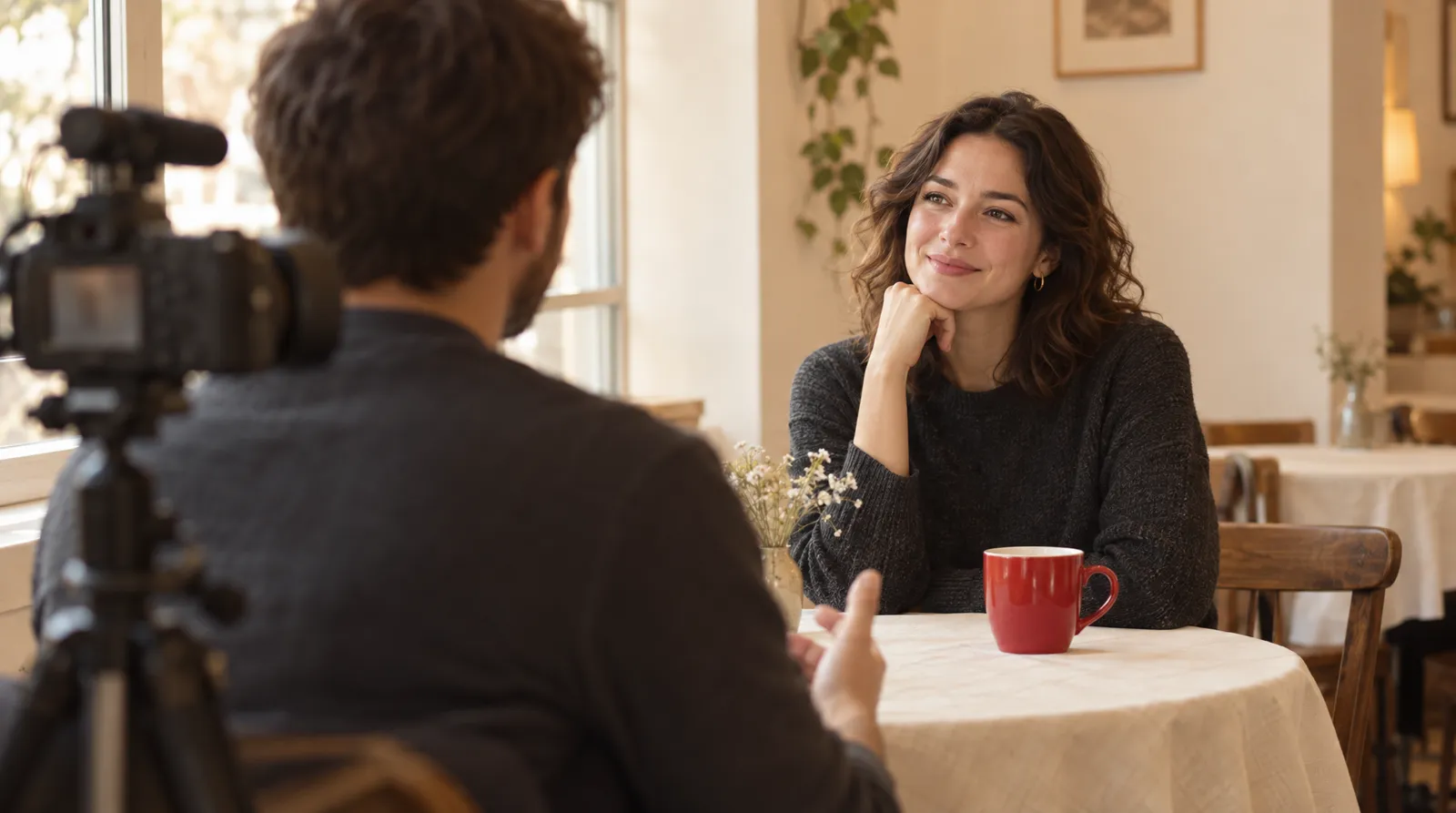
Almost every dialogue scene you've watched leans on over the shoulder shots. Below: the variants, a six-step setup, comparisons with POV and two shots, movie examples and how to ask an AI video generator for both angles. For the wider picture, see our guides to camera movements and angles and shot types in film.
Facts checked November 6, 2026; where sources disagree, we say so.
What is an over the shoulder shot?
An over the shoulder shot is a camera angle placed above and behind one subject's shoulder and head, looking toward another subject, according to Wikipedia. It's also called an OTS, a short over or a third-person shot. Its most common job is covering a back-and-forth conversation between two people.
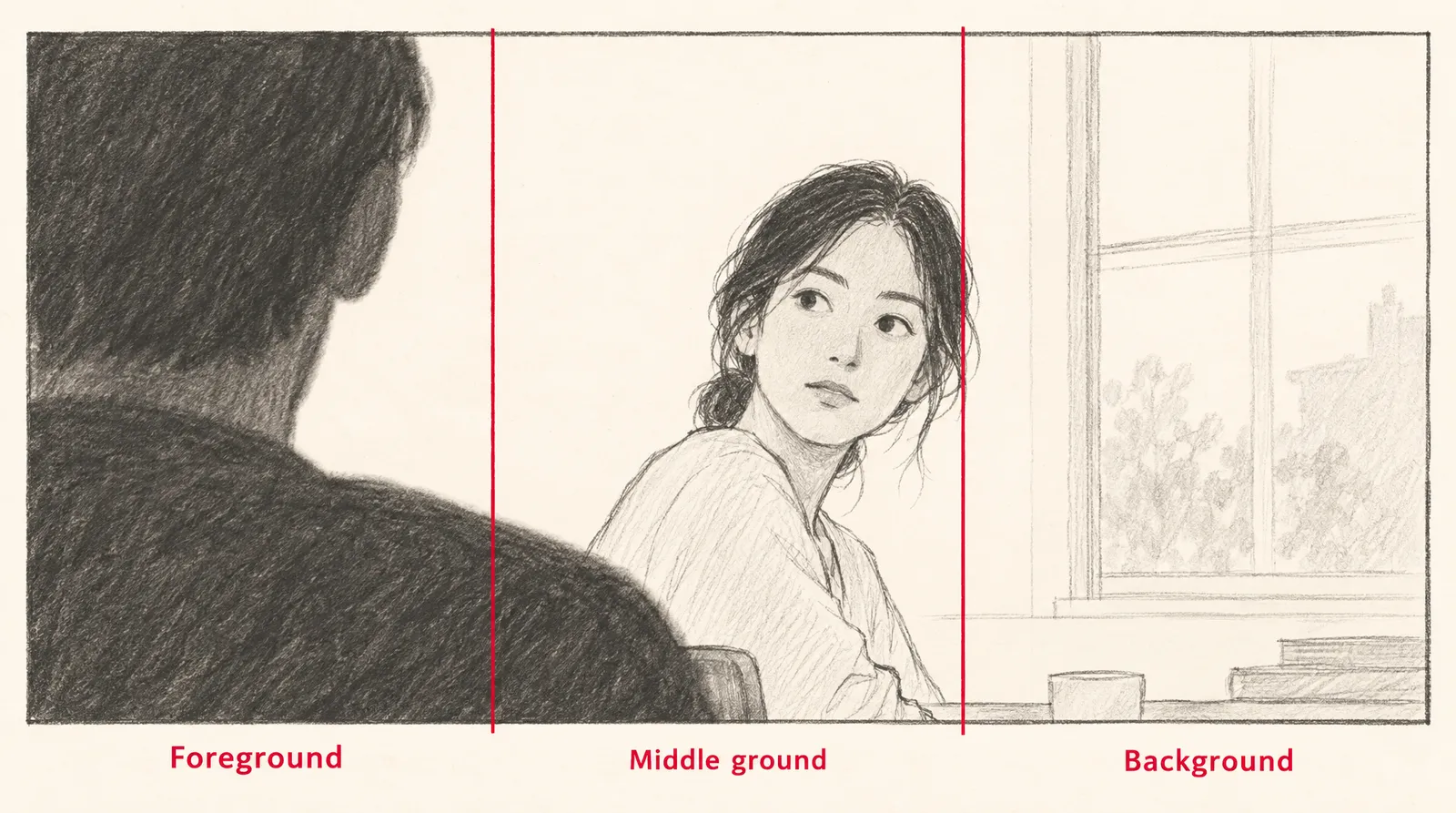
Because the back of one shoulder stays in frame, viewers understand where the two people are relative to each other while still getting a close look at one face. A conventional OTS has at least three layers of depth: the foreground shoulder, the face in the middle ground and the background behind it. Third-person video games simulate the same angle, with your avatar visible on screen.
A short history of the angle
Wikipedia names Vermeer's painting The Art of Painting (made 1666 to 1668) as one of the earliest appearances of the angle. It credits James Williamson's 1900 film Attack on a China Mission Station with the first reverse angle cut in film history, which is a cut to the opposite view, not necessarily an over the shoulder shot. Once editors could cut between angles, actors no longer had to cheat out toward the camera.
What is an over the shoulder shot used for?
An over the shoulder shot is used to cover a conversation while keeping both people anchored in space. Edit one OTS from each side back to back and you get a shot-reverse-shot sequence.
- Orientation: the shoulder shows where the listener sits. Alternating single shots can't do this, and Wikipedia notes singles can even be filmed days or months apart because nothing ties them together spatially.
- Connection: giving more screen time to one character's side of the conversation can make the audience relate to that character more, per Wikipedia.
- Power: Soundstripe advises keeping the lens near the eye height of the person facing camera, because raising or lowering it signals who holds power. Our high angle shot and low angle shot guides cover that effect.
- Tone shifts: breaking the usual OTS pattern partway through a scene can signal a change in mood.
Dirty vs clean over the shoulder shot (and the dirty single)
A dirty over keeps part of the foreground character in frame, while a clean over keeps the same camera position but frames that character out. Dirty isn't a judgment: Soundstripe says it only means something sits in the foreground, and that "dirty is not a criticism."
Three over the shoulder variants
| Variant | What's in frame | What you keep or lose | Counts as an OTS? |
|---|---|---|---|
| Dirty over | Soft shoulder and head of the near character, usually about a third of the frame; most are medium shots or medium close-ups | Keeps depth and geography | Yes |
| Clean over | Camera stays behind the near character, but that character is framed out | Keeps the vantage point, loses the depth | Treated as an OTS variant |
| Dirty single | Tight on one character with only a sliver of the other at the frame edge | Gets closest to the face, keeps little geography | Disputed: MasterClass groups it with OTS types, Soundstripe says it is not an OTS |
Sources: Soundstripe (updated Aug 28, 2026) and MasterClass, checked November 6, 2026.
The dirty single is where sources split. MasterClass lists "dirty single vs clean over" as one of three OTS types, while Soundstripe says a dirty single is not an OTS at all. Pick one definition for your shot list and say which one you mean.
How to shoot an over the shoulder shot
To shoot an over the shoulder shot, put the camera behind one actor and slightly to the side, at the eye height of the person facing camera. Videomaker goes over the right shoulder of one character and the left shoulder of the other.
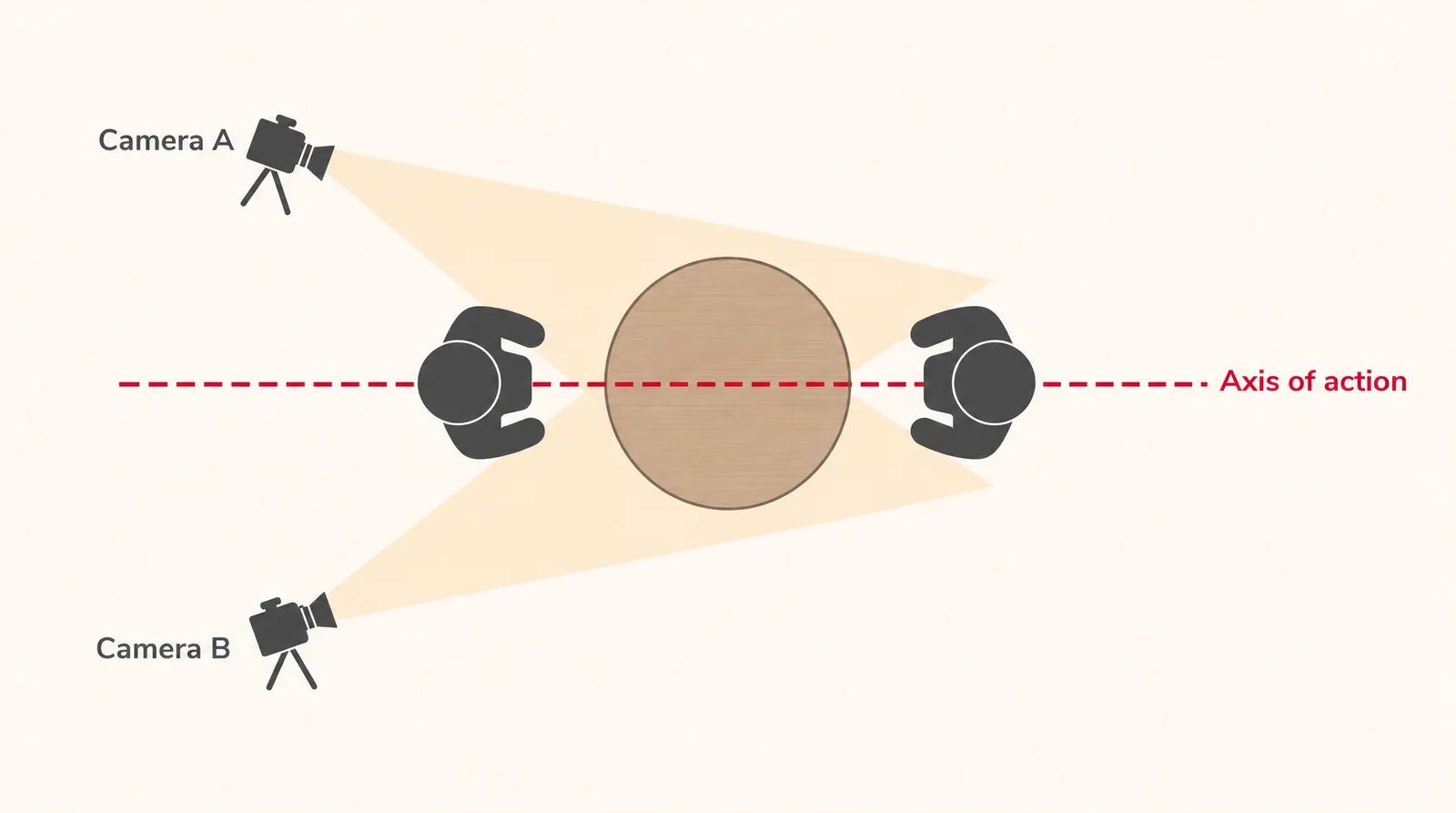
- Draw the axis: Picture a line through both actors (the axis of action) and keep every camera setup on one side of it.
- Place the camera: Set the camera behind the first actor and slightly to the side, so their shoulder and the back of their head edge into frame.
- Set the height: Keep the lens near the eye height of the actor facing camera; only raise or lower it if you want to signal power.
- Choose the lens: Use roughly 50mm to 85mm on full frame, or about 35mm to 55mm on Super 35, which Soundstripe says covers most OTS work.
- Frame and focus: Let the shoulder take about a third of the frame, leave more room in front of the face than behind it, and focus on the eye so the shoulder goes soft.
- Shoot the reverse: Move behind the second actor on the same side of the axis and match eyelines: if the first angle looks camera left, the reverse looks camera right.
Shooting alone or on a phone
The foreground shoulder ends up soft, so a stand-in of similar height can fill it while you frame. On a phone, skip the ultra-wide lens: Soundstripe notes that wider lenses push characters apart and bloat the shoulder. If only one person is available, alternating singles are the fallback, but you give up the geography that overs provide.
Common over the shoulder mistakes
- Too much shoulder: past about a third of the frame, it blocks the face instead of framing it (Soundstripe).
- A sharp shoulder: if the foreground is in focus, attention splits between it and the face (Soundstripe).
- Crossing the line: a setup on the wrong side of the axis flips the scene's geography, as Soundstripe's 180-degree rule guide explains.
- Angles too similar: under the 30-degree rule, two cut-together views of the same subject should be at least 30 degrees apart or clearly different in size (Wikipedia).
- Mismatched eyelines: both actors looking camera left makes them seem to face the same way instead of each other.
Over the shoulder shot vs POV, two shot and reverse angle
An over the shoulder shot keeps part of the viewing character in frame, while a POV shot removes that character and shows only what they see, as SIRUI's POV guide explains. Soundstripe's point of view shot guide puts it in one line: "The OTS does the orienting, the POV does the feeling."
Over the shoulder shot compared with related shots
| Shot | What's in frame | Main job |
|---|---|---|
| Over the shoulder (OTS) | Back of one character's shoulder and head, plus the other character's face | Gets close to a face while showing where both people are |
| POV | Only what the character sees; the character is out of frame | Puts the viewer inside one character's eyes |
| Two shot | Both characters in one frame | Shows the pair together in a single image |
| Alternating singles | One character per shot, no shoulder | Lets actors be filmed separately, but doesn't establish space |
| Reverse angle | The view from the opposite side of the first setup | Paired with an OTS, it creates shot-reverse-shot |
Sources: Wikipedia, SIRUI, Soundstripe, checked November 6, 2026.
Over the shoulder shot examples in movies
The most cited over the shoulder shot example in film is the diner scene in Heat (1995), which Soundstripe describes as covered almost entirely in overs. A few others worth studying:
- The Godfather: in the opening Bonasera scene, the camera slowly dollies back until it settles into an over the shoulder shot, per StudioBinder.
- Citizen Kane (1941): Soundstripe points to the projection room scene.
- Inception (2010) and Little Women (2019): both appear on Soundstripe's list of OTS examples.
- 30 Rock: Soundstripe's TV pick.
Not every director follows the pattern. Soundstripe calls the OTS "a convention, not a law" and names Yasujiro Ozu as a director who ignored it, and Frame.io walks through deliberate line-crossing in Fight Club.
How to draw an over the shoulder shot for a storyboard
To draw an over the shoulder shot, sketch three layers: a big, simple shoulder-and-head shape on one side, the facing character in the middle ground and a few background lines. These are our own composition rules drawn from the framing guidance above, not a sourced drawing method. For panel layout, see what a storyboard is.
- Divide the panel into thirds and block a dark, rounded shoulder and head into the left or right third.
- Draw the second character's head in the middle ground on the opposite side, facing toward the shoulder.
- Leave more empty space in front of the face than behind it.
- Add two or three background lines, like a window or wall edge, to show depth.
- Mark the reverse panel with the shoulder on the other side and the eyeline flipped.
Over the shoulder shot in photography
In still photography, an over the shoulder shot frames one person's face past another's shoulder. We found no dedicated source on it, but the video principles carry over: a soft foreground shoulder, focus on the eye and room in front of the face. Pair it with a close-up shot of the same moment.
How to make an over the shoulder shot with an AI video generator
You can ask an AI video generator for an over the shoulder shot by naming the framing, the person in focus and whose shoulder sits in the foreground. Kling's official multi-shot guide tells users to state the coverage, including over-the-shoulder, and to attach each line of dialogue to the right speaker. A community Veo 3 guide on Medium, not an official Google page, lists the same shot type.
Two prompts, two clips
On Klakix, each generation makes one clip, so angle A and its reverse are two runs on Text to Video. You then join them in the Video Editor (beta), where editing and MP4 export are free. How closely each model follows the framing isn't something we've measured, so treat the first result as a draft.
Angle A: "Over-the-shoulder shot, medium close-up. Camera behind a man in a gray wool coat; his right shoulder and the back of his head are soft in the left third of the frame. Across a diner booth, a woman with short red hair is in sharp focus, looking camera left, and says: 'You said Friday. It's Monday.' Warm window light, shallow depth of field, static camera."
Reverse: "Over-the-shoulder shot, medium close-up, reverse angle. Camera behind the woman with short red hair; her left shoulder and the back of her head are soft in the right third of the frame. The man in the gray wool coat is in sharp focus, looking camera right, and answers: 'I know. I'm sorry.' Same diner booth, same warm window light, shallow depth of field, static camera."
These work because they spell out whose shoulder is in front, who is sharp, which way each person looks and who says which line, and they repeat wardrobe and lighting so the two clips are more likely to cut together. Kling 3.0's built-in speech is English or Chinese; Veo 3.1 Lite generates dialogue and ambient sound with the picture.
Keeping the same characters in both angles
For matching faces across both clips, Kling 4.0 Reference on Image to Video takes up to 10 photos and 5 videos as references to keep a character consistent. Use fictional characters, for example ones you create with the AI image generator; photos of celebrities, politicians and people who haven't consented aren't allowed. Note that the Seedance reference models don't accept photos with human faces.
The sample below isn't an over the shoulder shot; it shows Kling 4.0 Reference combining a character photo and a product photo in one video.
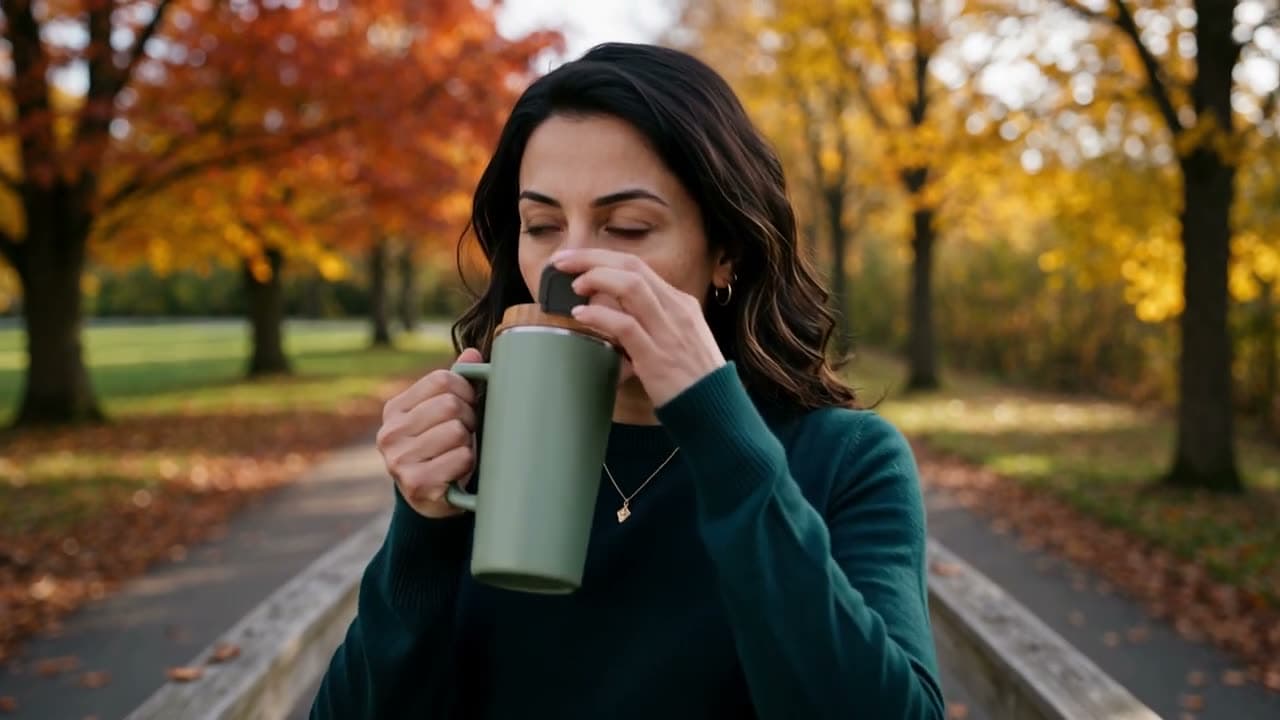
Each sample was generated in one take on this site with the model shown on it; nothing was edited.
What an AI over the shoulder pair costs
Credits for one OTS plus its reverse on Klakix
| Model | Default clip | Credits per clip | Two clips | About, on the Standard pack |
|---|---|---|---|---|
| Google Veo 3.1 Lite | 8 sec, 720p | 40 | 80 | $4.10 |
| Seedance 2.0 Mini | 5 sec, 720p | 48 | 96 | $4.90 |
| Kling 3.0 | 5 sec, 720p | 63 | 126 | $6.40 |
| Kling 4.0 Reference | 5 sec, 720p | 79 | 158 | $8.04 |
Source: Klakix catalog, checked November 6, 2026; may change. Dollar figures are our math on the Standard pack ($14 for 275 credits, about $0.051 per credit), before tax.
There's no free video tier: the 20 credits you get after verifying your email work only for voiceovers. If a generation fails, its credits are refunded automatically. Pack and subscription details are on the pricing page, and model notes are on the Kling and Google Veo pages.
Sources
The facts in this post were checked against the pages below on Nov 6, 2026. Prices and limits may change.
- Wikipedia: Over-the-shoulder shot (independent source)
- NFI: Over the shoulder shot (independent source)
- Soundstripe: Over the shoulder shot (independent source)
- MasterClass: Over the shoulder shot (independent source)
- Videomaker: Over the shoulder shot and its uses in cinema (independent source)
- Soundstripe: How to use the 180-degree rule (independent source)
- SIRUI: What is a POV shot (independent source)
- Soundstripe: Point of view shot (independent source)
- StudioBinder: Over the shoulder shot (independent source)
- Frame.io: The 180-degree rule and when to break it (independent source)
- Kling: Video 3.0 multi-shot guide (official source)
- Google Cloud community on Medium: Veo 3 prompting guide (independent source)
This post was drafted with AI assistance. Facts were checked against the sources above, and model, credit and price details were checked automatically against the site's current price list.
Frequently asked questions
What is an over the shoulder shot in film?
It's a camera angle taken from behind one character, with their shoulder and the back of their head in the foreground, looking at the other character's face. Filmmakers use it mainly for conversations, cutting between one from each side.
What is a dirty over the shoulder shot?
A dirty over keeps a soft piece of the near character, usually around a third of the frame, in the foreground. The word dirty only means something is in front of the subject; it isn't a criticism of the framing.
What is the difference between an over the shoulder shot and a POV shot?
An over the shoulder shot shows part of the character doing the looking, so it reads as a third-person view. A POV shot drops that character out of frame and shows exactly what they see, which feels more subjective.
Two shot vs over the shoulder: which should I use?
A two shot puts both people in one frame, which works when you want to show the pair together. An over the shoulder shot gets closer to one face while still showing where the other person is, so it suits the back-and-forth of dialogue.
Is a reverse angle shot the same as an over the shoulder shot?
Not quite. A reverse angle is any view from the opposite side of the previous setup, and it doesn't have to include a shoulder. When the reverse is itself an over the shoulder shot, the pair forms shot-reverse-shot.
What lens is best for an over the shoulder shot?
Soundstripe puts most OTS coverage between 50mm and 85mm on full frame, or about 35mm to 55mm on Super 35. Longer lenses compress the space between people, and wider ones spread them apart and make the shoulder look bigger.
What is an over the shoulder shot in photography?
In stills it's the same composition: one person's face photographed past another person's soft shoulder. Keep focus on the eye and leave a little more space in front of the face than behind it.
Can an AI video generator make an over the shoulder shot?
You can ask for one by naming the framing, the person in focus and whose shoulder is in the foreground. On Klakix the angle and its reverse are two separate generations that you join in the Video Editor, and results vary, so plan on a retry.
Try what you just read
Signing up is free. Video and image tools unlock after your first credit pack, and credits are refunded if a generation fails.
Open Text to Video