Guide · 11 min read · Nov 11, 2026
Blocking in film: how directors plan actors and camera
Blocking in film is the plan for where actors stand, how they move and where the camera sits and travels during a scene. It comes first on a shoot day: NYFA's 5-stage routine runs Block, Light, Rehearse, Adjustments, Shoot. Good blocking tells the story through distance, movement and camera position before anyone speaks.
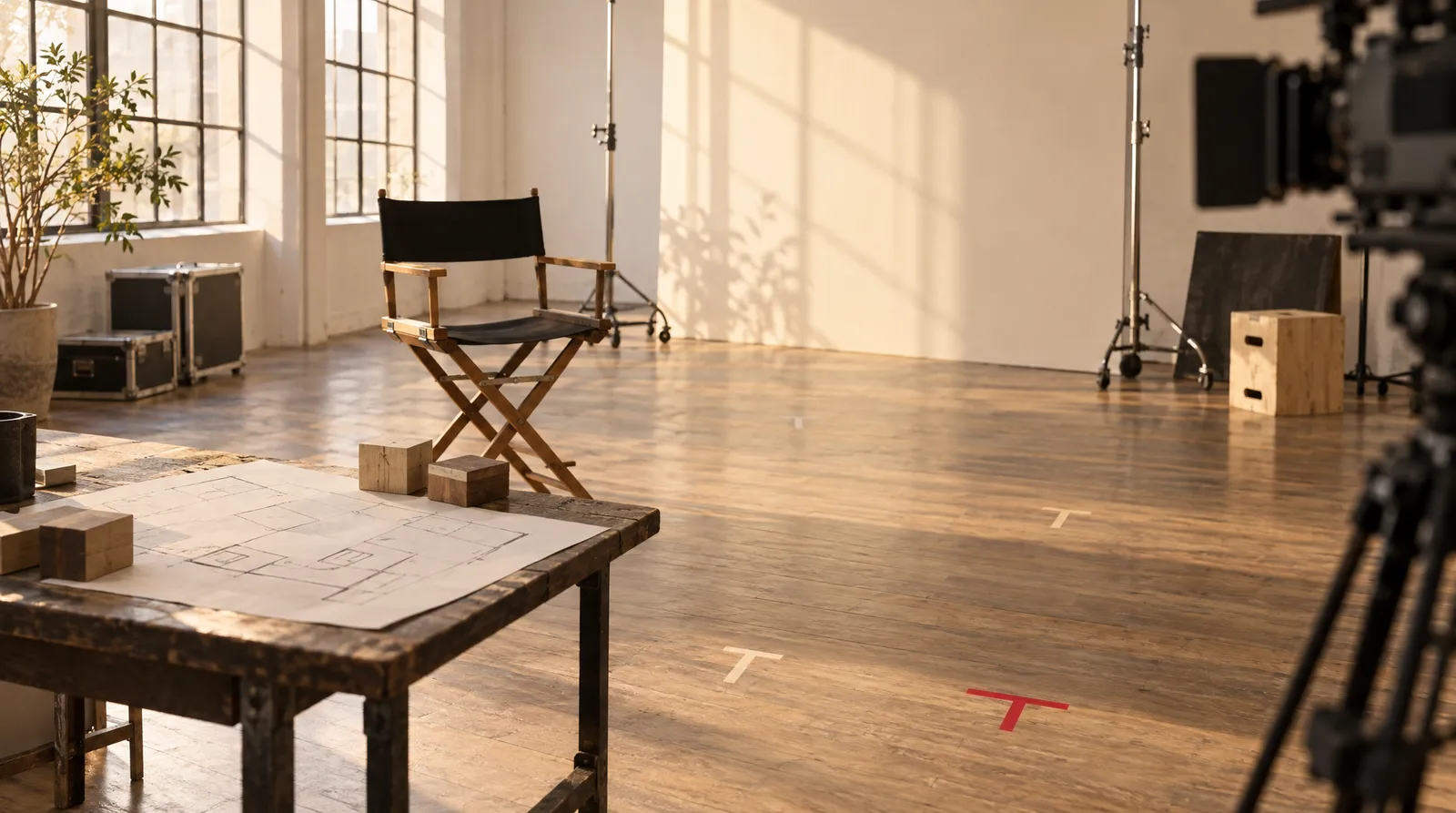
This guide explains what blocking in film means, how it differs from staging, framing and composition, how it runs on a real set, and how to block a scene yourself in six steps. You'll also find a glossary of on-set terms and a way to test your blocking without a crew.
Facts were checked on November 11, 2026 against film-school and production sources: Sony Cinematography's article by Steven Bernstein, ASC, NYFA, StudioBinder, No Film School and Wikipedia. No industry body publishes an official definition of blocking, so every definition here comes from educators and working filmmakers. If you want to preview a camera move before you shoot, Klakix's 3D Scene tool builds a simple blockout you can test moves on.
What is blocking in film?
Blocking in film is the arrangement of actors and camera for a scene: where each person stands, when and where they move, and where the camera starts, travels and ends. Cinematographer Steven Bernstein calls it "a combination of positioning actors and/or objects and positioning a camera or multiple cameras," done in anticipation of editing, according to Sony Cinematography.
The word comes from theatre, where Wikipedia defines it as "the precise arrangement of actors." Film adds a layer. In a theatre, the audience's view stays essentially the same, while in film the director decides what the audience sees and how: close-up or wide, single or group, profile or full face.
Actor blocking (character blocking)
Actor blocking is how performers move through the space: where they start, which line triggers a cross, where they stop. StudioBinder treats "performance blocking, or stage blocking, or actor blocking" as the same thing.
Camera blocking (shot blocking)
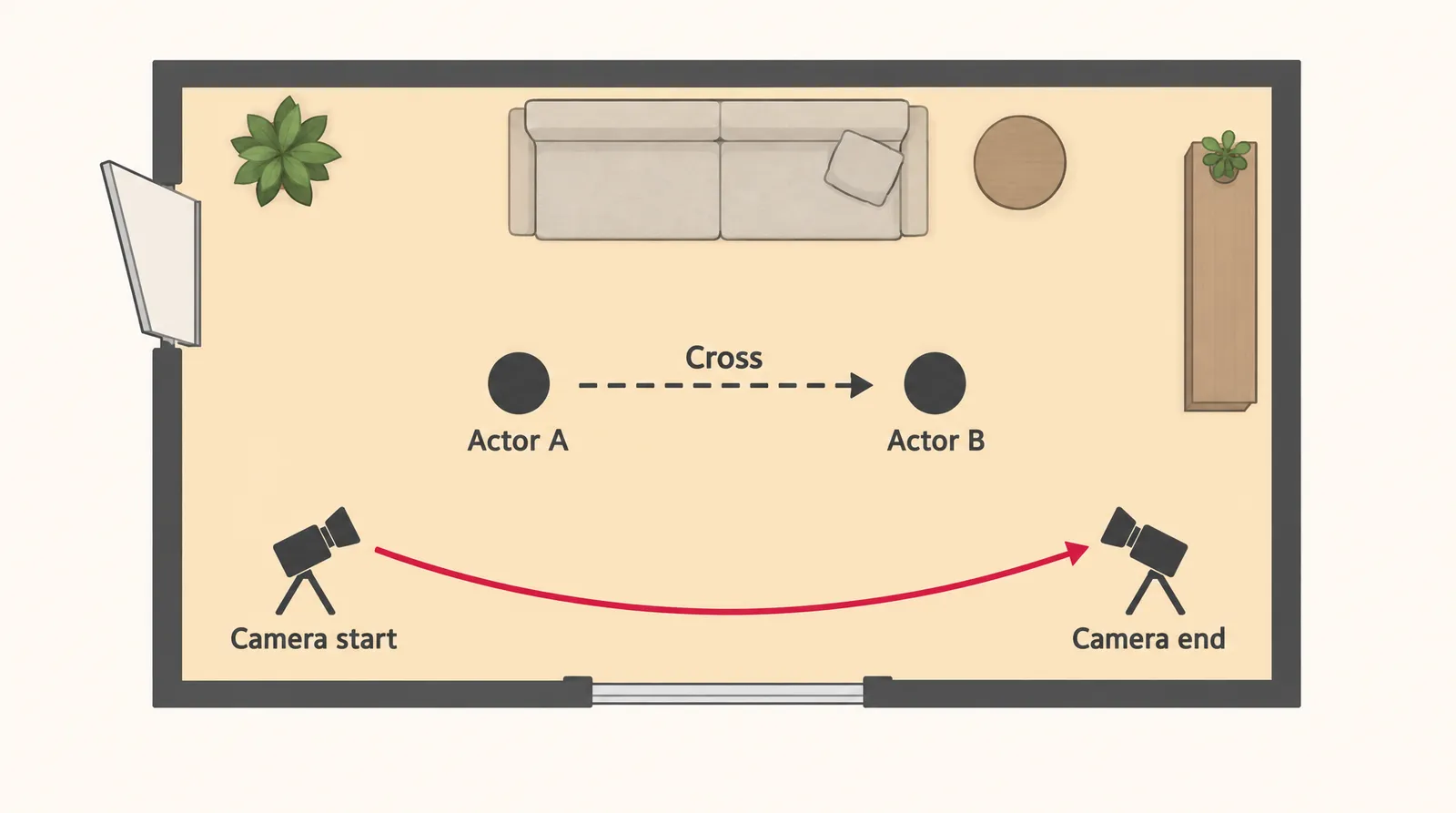
Camera blocking is where the camera starts, where it moves and where it ends up while the actors move, as filmdaft puts it. Write it down as three positions for every shot: start, move, end. If you need names for the moves, our guide to camera movements and the one on tracking shots cover the common ones.
Blocking vs staging vs framing vs composition
Blocking is position and movement over time, staging is the arrangement of the space, framing is what the camera includes, and composition is how things sit inside that frame. Staging is the term sources disagree on most. The table below gives working definitions you can use on your own set.
Blocking, staging, framing and composition compared
| Term | What it covers | Question it answers |
|---|---|---|
| Blocking | Actor positions and moves, plus camera position and moves | Who goes where, and where does the camera go? |
| Staging | Varies by source: objects and camera relative to the actors (StudioBinder), or the fixed layout of the space (Celtx) | What does the space look like around the action? |
| Framing | The edges of the shot: what's in and what's out | What does the audience see? |
| Composition | How elements are arranged inside the frame: balance, depth, lines | How is the picture organized? |
Sources: Sony Cinematography, StudioBinder, Celtx. Framing and composition rows are Klakix editorial working definitions. Checked November 11, 2026.
Framing choices like wide, medium and close-up are explained in our shot types guide.
How to block a scene in film, step by step
You block a scene by reading it, deciding what the space should say about the characters, walking the moves, fixing the camera path, marking positions and rehearsing with the camera. The routine below condenses the shoot-day practice described by NYFA and Sony Cinematography into steps a small team or solo creator can follow.
- Read the scene seated: Read the whole scene through with the actors sitting down, before anyone moves, and note who wants what.
- Decide distance and power: Use space, shapes and lines: decide when characters are close or far apart and who holds the stronger position at each beat.
- Put it on its feet: Have the actors walk the scene and tie each move, or cross, to a specific line or beat.
- Set the camera start, move and end: For each shot, write where the camera begins, how it travels and where it stops relative to the actors.
- Mark the positions: Run the blocking and stop at every key position so each actor's spot gets a tape mark in their own color.
- Rehearse with the camera: Run a camera rehearsal of the first setup, adjust what doesn't work, then shoot and repeat for the next setup.
For a two-person dialogue, No Film School calls the triangle method the simplest approach to filming the scene. It pairs well with over the shoulder shots.
How blocking works in film production
On a professional set, blocking is the first stage of every setup, before lighting. NYFA's Peter D. Marshall splits each setup into five parts: Block, Light, Rehearse, Adjustments, Shoot, then repeat. He defines blocking a scene as "working out the details of an actor's moves in relation to the camera."
Bernstein describes the usual flow: a seated read, then the director says something like "let's put this scene on its feet." Director and actors work out movement while the director and cinematographer think about angles, ideally as a collaboration. In the "stopping rehearsal" the actors pause so the assistant camera person can mark their spots with tape or sandbags, a different tape color per actor, because lighting and focus depend on those marks.
Stand-ins then take the actors' places while lighting and camera are set and the actors go to hair, make-up and wardrobe. Stand-ins usually match the actor's build and wardrobe, and on set they're called "second team," according to Stand-In Central.
Blocking terms you'll hear on set
| Term | Meaning |
|---|---|
| Mark | A tape or sandbag spot showing where an actor stops |
| T-mark | T-shaped tape where the actor's toes stop |
| Cross | Any move from one position to another |
| Screen left / camera left | Left as seen from the camera, the film version of stage left |
| Upstage / downstage | Theatre terms for the back and front of the playing space |
| First team / second team | The principal actors / their stand-ins |
| Coverage | Filming each line from more than one angle, usually a wide shot and a close-up |
| Stopping or marking rehearsal | A run where actors pause so their positions can be marked |
Sources: Wikipedia (Blocking, stage), Sony Cinematography, DFI Rentals, Stand-In Central. Checked November 11, 2026.
DFI Rentals notes that hitting marks consistently is a core actor skill, because focus, framing and lighting are all set to those positions.
Examples of blocking in film
A well-known example of blocking in film is the duel in Django, where characters circle each other slowly in a face-off. No Film School's blocking guide uses it, along with Parasite and 1917, to explain space, shape, line and power. Another example is planning: according to Sony Cinematography, the Coen brothers storyboard their entire movies and have shown mounted storyboards to the crew.
You can apply StudioBinder's three factors, Space, Shapes and Lines, to simple scenes of your own. These are our illustrations, not scenes from a specific film:
- Space: Two partners start at opposite ends of a long table and end the scene side by side, so the distance tells the story.
- Shapes: Three characters stand in a triangle, and whoever sits at the top point reads as the one in control.
- Lines: A character walks a straight diagonal toward the camera to signal a decision, instead of drifting sideways.
Why is it called blocking?
The commonly told story is that 19th-century theatre directors such as W. S. Gilbert worked out scenes on a miniature model stage, using a block to stand in for each actor. Mike Leigh's 1999 film Topsy-Turvy shows the practice. The story isn't fully settled, though: Wikipedia also says the terms were applied to theatre "from as early as 1961," and StageMilk admits, "Even if it isn't strictly true, it's a great yarn." In that story, the blocks sat on a model stage, not on the real stage floor.
How to plan blocking without a crew
You can plan blocking without a crew through previs, short for previsualization: Wikipedia defines it as visualizing scenes "before their physical production." Filmdaft lists storyboards, animatics, 3D animation and virtual simulations as previs tools for planning angles, blocking and shot timing. A storyboard or a timed animatic costs nothing but time.
On Klakix, 3D Scene (beta) is the closest match for camera blocking. You describe a scene or open one of four ready-made blockouts, AI builds it as a simple 3D blockout, and you assign each shot one of 16 camera moves. Seedance 2.5 Reference then turns the blockout video into a realistic video with the same camera move. Camera work is free; the blockout and the final video cost credits.
Seedance 2.5 Reference in Image to Video makes 4 to 30 second clips at 480p, 720p or 1080p, from 41 to 1,841 credits; the default (720p, 5 sec, 16:9) is 116 credits. Our math: that's about $7.73 at Mini-pack rates ($5 for 75 credits), but one Mini pack doesn't cover it, so you'd buy two or the Standard pack (275 credits, $14). Kling 4.0 Reference keeps a character, product or place consistent across up to 10 photos and 5 videos, with a 79-credit default. Prices checked November 11, 2026; they may change, see pricing.


Each sample was generated in one take on this site with the model shown on it; nothing was edited.
Sources
The facts in this post were checked against the pages below on Nov 11, 2026. Prices and limits may change.
- Sony Cinematography: The Cinematographer and Scene Blocking (independent source)
- StudioBinder: Blocking and staging scenes (independent source)
- filmdaft: What is blocking in film (independent source)
- Beverly Boy: What is blocking in film (independent source)
- Celtx: How to block a film scene (independent source)
- No Film School: Blocking a conversation (independent source)
- NYFA: The 5 Stages of Blocking a Scene (independent source)
- Stand-In Central: The routine (independent source)
- DFI Rentals: What is blocking in film (independent source)
- No Film School: Film blocking guide (independent source)
- StageMilk: What is blocking (independent source)
- Wikipedia: Previsualization (independent source)
- filmdaft: What is previs (independent source)
This post was drafted with AI assistance. Facts were checked against the sources above, and model, credit and price details were checked automatically against the site's current price list.
Frequently asked questions
What does blocking mean in film?
Blocking means planning where actors stand and move in a scene and where the camera is placed and moves. It's worked out before lighting so focus, framing and lights can be set to known positions.
What is camera blocking in film?
Camera blocking is the plan for where the camera starts, how it moves and where it ends while the actors move. Writing those three positions for every shot keeps the crew and the edit on the same page.
Who does the blocking in a film, the director, the DP or the actors?
The director usually leads it. Directors and actors work out movement while the director and cinematographer think about angles, and ideally it becomes a collaboration among all three.
What is staging vs blocking in film?
There's no single standard. A useful working rule is that staging is the arrangement of the space and blocking is the movement through it, with camera placement as the audience's seat. Agree on the terms with your team before the shoot.
What is the difference between blocking and framing?
Blocking decides where people and the camera are and how they move over time. Framing decides what the edges of a single shot include, so the same blocking can be framed wide or tight.
What is a marking rehearsal in film?
It's a run of the agreed blocking where the actors stop at each key position so the camera assistant can mark their spots with tape or sandbags. Each actor usually gets a different tape color.
What is a blocking diagram?
A blocking diagram is a top-down sketch of the set showing where actors start, the path of each cross and where the camera sits and moves. Symbols vary from team to team, so keep a small legend on the page.
Is blocking in film the same as blocking in theatre?
The core idea is the same, positioning and moving actors, but film adds the camera. In theatre the audience's view stays essentially fixed, while in film the camera decides what the viewer sees and from how close.
Try what you just read
Signing up is free. Video and image tools unlock after your first credit pack, and credits are refunded if a generation fails.
Open Image to Video